
By Anand Pai V
Two correct joins can produce an incorrect total. Follow two child tables through a four-row expansion, then fix the report by aggregating each child first.
Your order report says a customer bought goods worth 100 and paid 100. The original records say 50 and 50. Every join condition looks correct. Where did the extra money come from?
This is a useful next step after learning basic joins: joining two one-to-many relationships can multiply both sets of records. We will reproduce the error with SQLite, inspect its cause, and repair the report without discarding legitimate transactions.
Begin with the meaning of one row
A table's grain describes what one row represents. Here, an order row represents an order; an item row represents one purchased item; a payment row represents one payment. Our desired report has one row per order.
Run this setup in a fresh SQLite database. The amounts are simple whole-number teaching values.
CREATE TABLE orders (id INTEGER PRIMARY KEY);
CREATE TABLE items (
  id INTEGER PRIMARY KEY, order_id INTEGER, amount INTEGER
);
CREATE TABLE payments (
  id INTEGER PRIMARY KEY, order_id INTEGER, amount INTEGER
);

INSERT INTO orders VALUES (101), (102);
INSERT INTO items VALUES (1, 101, 30), (2, 101, 20), (3, 102, 40);
INSERT INTO payments VALUES (11, 101, 25), (12, 101, 25);
Order 101 has two items worth 50 in total and two payments worth 50. Order 102 has one item worth 40 and no payments.
Inspect the expansion before calculating
SELECT o.id, i.id AS item_id, i.amount AS item_amount,
       p.id AS payment_id, p.amount AS payment_amount
FROM orders AS o
LEFT JOIN items AS i ON i.order_id = o.id
LEFT JOIN payments AS p ON p.order_id = o.id
ORDER BY o.id, i.id, p.id;
For order 101, the result contains these four combinations:
| Item | Item amount | Payment | Payment amount |
|---|---|---|---|
| 1 | 30 | 11 | 25 |
| 1 | 30 | 12 | 25 |
| 2 | 20 | 11 | 25 |
| 2 | 20 | 12 | 25 |
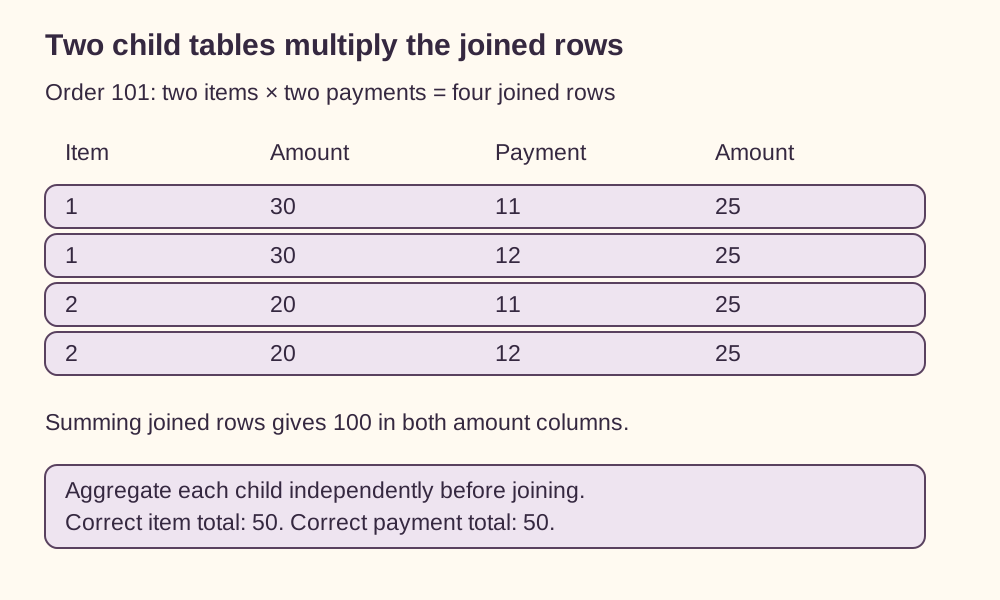
Each item matches both payments. Two item rows multiplied by two payment rows produce four joined rows. SQLite's join documentation explains the underlying combination of rows and subsequent filtering by the join condition. Our condition allows all four combinations because all belong to the same order. SQLite SELECT documentation
If we now group by order and sum both amount columns, the item total becomes 30 + 30 + 20 + 20 = 100. The payment total becomes 25 + 25 + 25 + 25 = 100. Grouping produces one output row, but the sums still consume the expanded input.
Try explaining the duplication using transaction identifiers. Item 1 appears twice because two payment records match it. Payment 11 appears twice because two item records match it. This makes the cause visible before any aggregate hides the repeated rows.
Reduce each child to the report's grain
Calculate each total independently, then join those totals:
WITH item_totals AS (
  SELECT order_id, SUM(amount) AS item_total
  FROM items GROUP BY order_id
), payment_totals AS (
  SELECT order_id, SUM(amount) AS paid_total
  FROM payments GROUP BY order_id
)
SELECT o.id,
       COALESCE(i.item_total, 0) AS item_total,
       COALESCE(p.paid_total, 0) AS paid_total
FROM orders AS o
LEFT JOIN item_totals AS i ON i.order_id = o.id
LEFT JOIN payment_totals AS p ON p.order_id = o.id
ORDER BY o.id;
The result is 101 → 50, 50 and 102 → 40, 0. Each intermediate table has at most one row per order, so neither can multiply the other. The final query needs no aggregation. We interpret an absent payment record as zero paid in this example.
Do not use SUM(DISTINCT amount) as a general repair. SQLite applies DISTINCT to values passed into the aggregate. Our two legitimate payments share the value 25, so that expression would count only 25. Transaction identity and transaction value answer different questions. SQLite aggregate documentation
Transfer exercise
A project has three expense records worth 10, 20, and 30, plus two refund records worth 5 each. You join projects to both child tables, then sum expenses and refunds by project.
Before running anything, calculate the row count and both incorrect totals. Then describe the intermediate tables required for a correct report. Would changing the final GROUP BY to the project identifier solve the problem?
Answer
The join produces six rows. Each expense appears twice, making the expense total 120. Each refund appears three times, making the refund total 30. The true totals are 60 and 10.
Build one expense-total row per project and one refund-total row per project before joining them to projects. Grouping the already-expanded rows by project cannot undo the multiplication. Before trusting a multi-table total, write down what one row means at every stage.