Aabha Python for AI and Data · Course package
Start with SYLLABUS.md, then open
course.html in a browser or read the numbered files in
lessons/. The HTML guide is an offline reading edition of
the same lessons, not a Python runner. Keep this folder together so
images and downloads resolve.
Choose a practice route
Browser-first: open https://lab.aabhaai.com/ and select
the profile named by the lesson. Paste the whole relevant file from
examples/ or your completed exercise into Editable
practice.py, then Run Python. Each run starts fresh. Keep needed
definitions and data in the same run. Download edited work before
leaving. The course does not rely on files surviving another run or
reload. The lab's Check example button belongs to its preset; it does
not grade these course exercises or record completion.
Optional local route: install Python from its official source if you do not have it, unzip the course, and open a terminal in this folder. Python 3.12 is the tested local baseline. Creating a new virtual environment does not change the system Python. Commands are terminal commands, not code to paste into the Python editor.
macOS/Linux:
python3 -m venv .venv
.venv/bin/python -m pip install -r requirements.txt
.venv/bin/python examples/00_first_run.py
.venv/bin/python -m unittest discover -s tests -v
.venv/bin/python -m solutions.capstone
Windows PowerShell, if py -3.12 is installed:
py -3.12 -m venv .venv
.\.venv\Scripts\python.exe -m pip install -r requirements.txt
.\.venv\Scripts\python.exe examples\00_first_run.py
.\.venv\Scripts\python.exe -m unittest discover -s tests -v
.\.venv\Scripts\python.exe -m solutions.capstone
Use the full interpreter path shown here; activation and PowerShell execution-policy changes are unnecessary. Initial installation needs internet and disk space. If your Python version differs, use compatible package versions and record what you actually test. The pins reproduce the authoring environment, not every operating system or browser runtime. Windows/macOS commands were reviewed but not executed in this Linux workspace.
For your capstone, run python check_capstone.py; it
loads your exercise file and tests your clean_orders, not a
reference answer. The browser starter embeds the same public checker.
BRIDGE_SOLUTIONS.md has separate answers to the new
bridge/transfer checkpoints.
The unit suite tests the reference implementation. To assess your
readiness file specifically, use python check_readiness.py
after completing exercises/readiness.py. The incomplete
readiness file is expected to fail until you implement it. The
interactive browser route is enough for required lessons; local files
and module-import extensions are optional.
Contents
lessons/: ordered explanations, worked examples, exercises and exit checksexamples/: ready-to-run examples; files labelled local-only need this folderexercises/: clearly incomplete starters to finish yourselfsolutions/andSOLUTIONS.md: separate worked answers and explanationsdatasets/: synthetic CSVs, schema and defect policyassets/: original instructional SVG diagramstests/: automated reference-solution and regression testsoutputs/: generated reference results, never replacements for raw datasetsintegration/: proposed content manifest and release checklist; no site has been editedVERIFICATION.md: actual execution results, browser coverage and limitations
Troubleshooting
A NameError often means a definition was omitted or spelled differently. A SyntaxError may point just after a missing quote or bracket. An IndentationError means block spacing is inconsistent. A ModuleNotFoundError for NumPy/pandas/Matplotlib usually means the wrong lab profile or local interpreter. A local FileNotFoundError means a path resolved somewhere other than expected: run from this folder, or use the provided path-based example. If the lab hangs, use Stop and reduce the task; do not rerun an unbounded loop. Package loading requires an available network.
This package contains original instructional text, code, diagrams and
invented datasets. External documentation is linked for reference and
not redistributed. Review SOURCES.md and the integration
checklist before publication. This is a content/testing handoff, not a
live course launch or completed learner pilot.
Python for AI and Data
Aabha AI Academy · Foundation course
Outcome: write understandable Python, inspect and clean a small table without hiding data loss, and communicate a reproducible summary with an honest chart.
Audience: people starting programming, and builders who need a reliable Python foundation. No previous coding is assumed. You should be comfortable opening a browser, saving a text file and doing everyday arithmetic. A laptop or desktop keyboard is strongly recommended for substantial editing; the browser route needs internet for initial runtime/package loading.
Planning estimate: about 24–32 hours including practice, troubleshooting and the capstone, not a guaranteed completion time. Take breaks and repeat exercises rather than rushing. Modules 0–9 each have a worked script, three focused practice tasks, an exit check and separately located solutions. Module 10 combines the skills into one assessed project. There are no exams or credentials automatically awarded by these files.
Sequence and evidence of learning
| Order | Module | Practice target | Suggested effort | Lab profile |
|---|---|---|---|---|
| 0 | Run, change, explain | Run code, distinguish source/output and keep a copy | 30–45 min | Python basics |
| 1 | Values, names and types | Convert text deliberately and calculate with units | 90–120 min | Python basics |
| 2 | Decisions and repetition | Trace branches and loops, including boundaries | 2 h | Python basics |
| 3 | Collections and records | Select lists/dicts/sets/tuples; avoid shared-edit mistakes | 2 h | Python basics |
| 4 | Functions and modules | Write a clear input/output contract and reuse a function | 2 h | Python basics |
| 5 | Files, CSV and errors | Read rows, preserve bad input and handle expected failures | 2–3 h | Python basics |
| 6 | Debugging and tests | Reproduce a bug and guard a fix with edge-case tests | 2 h | Python basics |
| 7 | NumPy arrays | Explain shape, axes, elementwise operations and copies | 2 h | Data |
| 8 | pandas tables | Inspect, normalize, validate, filter and group small data | 2–3 h | Data |
| 9 | Charts that answer a question | Choose a chart, label units and state limitations | 2 h | Charts |
| 10 | Capstone: workshop-order audit | Deliver source, quality report, clean outputs and a chart | 5–7 h including bridge labs | Data / Charts or local |
Using the exercise starters
Lines beginning with assert are supplied checks. Keep
the supplied input and its expectation together as your first case: a
false expectation raises AssertionError and stops that run. Blanks use
None or NotImplementedError deliberately, so an unfinished
starter is expected to fail. Write your answer above the checks, rerun
the whole file and read the first failure. Module 6 explains tests in
detail. For a new input, decide the expected result from the written
contract BEFORE running, then add a separate matched case. For example,
30 minutes expects long, while 0 expects rest;
an unchanged long assertion attached to input 0 tests the
wrong rule. Never change an expectation merely to fit broken output. A
passing check is followed by an explanation and a genuinely changed
input.
Completion standard
Do not complete a module solely because its example ran. Before moving on, explain the exit check in your own words, solve the exercises without copying the reference, and deliberately test a changed input. If you consult a solution, close it and recreate the approach from memory with another input.
For the capstone, run the supplied public checks against YOUR
function using python check_capstone.py, or the checks
embedded in the browser starter. Then submit the script, original CSV,
accepted/rejected/duplicate exports, category summary, labelled chart,
test results and a short interpretation. Passing reference tests is not
a learner grade. Score with the rubric in
lessons/10_capstone.md: at least 16/20 and no critical
failure. Critical failures are editing raw evidence to pass checks,
silently discarding invalid records, a non-reproducible result, or
describing the accepted subtotal as a complete sales total. This is a
proposed instructional assessment, not a claim that a learner pilot has
passed it.
Optional readiness route
Experienced learners may attempt exercises/readiness.py
before Module 1. Implement all four functions and pass
python check_readiness.py. Also explain aliasing, an
empty-input policy, and why an invalid CSV row must remain visible. This
is a lightweight placement screen, not proof of every skill in Modules
1–6. Before skipping ahead, also complete the Module 5 CSV
export/round-trip task and the Module 6 diagnostic worksheet, and review
the optional local-import example if you will work locally. Then begin
at Module 7; the screen is not evidence of NumPy/pandas proficiency. If
any task is unfamiliar, use Modules 1–6.
Boundaries
This course prepares learners for later AI engineering courses. It does not teach model fitting, train/test splits, deep learning, generative-AI APIs, deployment, web scraping or production data engineering. AI tools are optional: predict outputs and attempt the work yourself first; do not paste private datasets or credentials into a lab or assistant.
Course design and source fit
The public course page reviewed on 14 October 2026 identifies a
planned beginner Python foundation followed by an applied data project,
with enrolment not open. This package expands that scope into teachable
material; it does not change enrolment or public completion status.
Browser profile details and the exact test coverage are recorded in
VERIFICATION.md. Links to current primary documentation are
in SOURCES.md.
0 · Run, change, explain
Outcome: run a short program, distinguish its source from its output, and keep your work. Profile: Python basics. Time: 30–45 minutes.
What a program does
A program is a sequence of instructions written precisely enough for a computer to carry out. Python reads your source code and evaluates it. The output is the result of that run; it is not a second version of the program. If the program prints 25, typing 25 into the editor does not recreate the calculation that produced it.
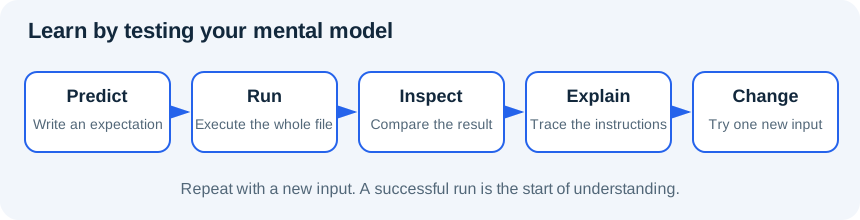
Learning to program starts with a useful loop: predict, run, compare, explain, change. Predicting makes you notice the parts you do not understand. When an output surprises you, the next step is to trace the instructions, not to try random punctuation until the error disappears.
Your first browser run
- Open Aabha Code Lab. This is a separate practice workspace.
- Choose Python basics in Practice profile. It loads the Python runtime without the data-science packages.
- Copy the entire worked example below into Editable practice.py, replacing the preset.
- Before running, write down the three lines you expect. Select Run Python and read Execution output.
- Change
minutes = 15tominutes = 20. Predict which output lines will change. Run the whole program again. - Select Download edited work and keep the downloaded copy somewhere you can find it. The lab stores edits in this browser origin, but that is not a backup.
Each run begins with a fresh Python execution context. A variable from an earlier run is not a reliable dependency. Put every required definition in the code you run now. The lab's Check example validates its own preset exercise; it does not grade this course or award completion. Stop ends a run. Reset workspace can replace edits, so save your work before using it. We do not rely on reset or reload to preserve generated files.
Worked example
# Profile: Python basics. Run this entire file in a fresh run.
print("Hello, data learner!")
minutes = 15
print("Practice minutes:", minutes)
print("After another session:", minutes + 10)
# A comment explains intent. Python does not execute the comment.The quotes identify text. Parentheses enclose the arguments supplied
to print. The equals sign assigns the value 15 to the name
minutes; it is not an equality question. The final line
calculates a value and prints it, but does not change
minutes. The line beginning with # is a
comment for people reading the code.
Expected output, apart from the lab's runtime messages:
Hello, data learner!
Practice minutes: 15
After another session: 25
First errors are information
Delete the closing quote after Hello, data learner! and
run again. Python cannot parse the text, so it reports a SyntaxError.
Restore the quote and rerun. Next, change just one use of
minutes to minute. Python reports a NameError
because those are different names. Undo it. These are controlled
experiments; do not leave the broken version as your final work.
Do not paste private records, credentials or secret tokens into practice code. All course data is synthetic. The lab needs network access for initial package loading, and a slow first run does not necessarily mean your program is wrong.
Practice
Open exercises/00_first_run.py.
- 0A: print
Hello, Aabha learner!with that exact punctuation. - 0B: assign 20 to
minutes, then print the result of adding 15. - 0C: add a comment explaining why the result is 35. Download the program, reopen the saved text and check that your change is present.
Exit check
Explain which is source, which is output and which is a comment. Why
should a fresh run include its own definitions? What will
print(minutes + 15) do if there is no earlier assignment in
the same program?
Move on once you can predict all three lines without running the
example. See the separate SOLUTIONS.md only after
trying.
Further reading
Back to contents1 · Values, names and types
Outcome: choose simple types, calculate with explicit units and convert text deliberately. Prerequisite: Module 0. Profile: Python basics. Time: 90–120 minutes.
A name refers to a value
A value is data, such as the number 3 or the text
"notebook". A name gives you a way to refer to it. In
quantity = 3, Python evaluates the right-hand side and
binds quantity to that value. Later,
quantity = quantity + 1 reads the old value, calculates 4
and rebinds the name. It is an update instruction, not an algebra
equation.
Use names that carry meaning: unit_price_cents is more
informative than p. Names are case-sensitive.
total and Total are different. Avoid naming a
variable list, str, sum or
print: those names already refer to useful Python tools,
and replacing them makes later code confusing.
The main types we need first are int for integers,
float for approximate real-number calculations,
str for text, bool for True/False and
None for an explicit absence of a value. Text that looks
numeric is still text: "4" + "2" joins two strings into
"42"; 4 + 2 adds two integers.
type(value).__name__ helps identify the difference.
Expressions and units
An expression produces a value. Multiplication uses *;
division / produces a float; // gives floor
division; % gives the remainder. With non-negative whole
minutes, 135 // 60 is 2 hours and 135 % 60 is
15 minutes. For negative numbers floor division rounds down rather than
toward zero, so do not assume that example covers negative-duration
rules.
Multiplication and division are evaluated before addition and
subtraction. Parentheses make intent explicit: (10 + 5) * 2
is 30, while 10 + 5 * 2 is 20. A correct expression can
still answer the wrong question if units are mixed. Keep cents and
currency units clearly distinguished. Our fictional prices use integer
cents to avoid a floating-point rounding issue in simple totals; this
does not make the example a complete accounting system.
Worked example
# Profile: Python basics
item = "notebook"
quantity = 3
unit_price_cents = 250
subtotal_cents = quantity * unit_price_cents
print(f"{quantity} {item}s: {subtotal_cents} cents")
print(type(quantity).__name__, type(item).__name__)
print("Whole hours:", 95 // 60)
print("Minutes left:", 95 % 60)
raw_quantity = "4"
print("Text joined:", raw_quantity + "2")
print("Numbers added:", int(raw_quantity) + 2)
print("Available:", quantity > 0)
# Ordinary binary floats cannot represent every decimal exactly.
print("Float equality:", 0.1 + 0.2 == 0.3)Trace the subtotal: quantity 3 multiplied by 250 cents per item gives 750 cents. It does not give 750 currency units. The f-string inserts values inside braces into a readable message. Formatting a number changes how it is displayed, not the underlying quantity.
Expected key results: 3 notebooks: 750 cents, types
int str, whole hours 1, minutes left
35, text 42, number 6,
availability True, float equality False.
Convert, do not guess
int("4") converts valid integer text.
int("four") raises ValueError because the content does not
match that conversion. int(2.9) truncates to 2; it is not a
validation rule for whole-number input. Later, we will handle invalid
values without losing the original record.
Strings have useful methods: " Data ".strip().lower()
removes outer whitespace and lowercases text, yielding
"data". It does not remove spaces from the middle or repair
misspellings. Methods are operations attached to a value; the dot
connects the value and method name. Most string methods return new
strings rather than changing the original name's value.
Comparisons such as quantity > 0,
quantity == 3 and quantity != 0 produce
booleans. = assigns; == compares. Python's
binary floating-point representation cannot represent all decimal
fractions exactly, which is why the last line prints False. We will use
math.isclose in numeric tests rather than expecting exact
equality for approximate results.
Practice
Complete exercises/01_values.py; the None
values are deliberate blanks.
- 1A: calculate the cost of four items at 175 cents each. Print the total with its unit.
- 1B: split 135 minutes into whole hours and leftover minutes. Repeat with 0 and 59.
- 1C: convert
"7"to an integer and add 3; normalize" Data "to"data". Explain why conversion and normalization are separate operations.
Exit check
What is the difference between "20", 20 and
20.0? Why does int(2.9) not prove that 2.9 is
a valid count? If a price is 175 cents, which name would make your
calculation easier to review? Predict 2 + 3 * 4 and
(2 + 3) * 4 before running them.
Further reading
Back to contents2 · Decisions and repetition
Outcome: trace a branch or loop and test its boundaries. Prerequisite: Module 1. Profile: Python basics. Time: about 2 hours.
Make a rule explicit
Programs often apply the same rule to different values. An
if statement selects a block when its condition is true.
Optional elif branches test alternatives in order, and
else handles whatever remains. Only the first matching
branch of that chain runs. This order matters: if
minutes >= 0 comes before minutes >= 30,
every non-negative value will match the first branch and the later
branch cannot classify a long session.
A colon ends the condition line. The following block is indented
consistently, normally with four spaces. Indentation is part of Python's
syntax; it shows what belongs to the branch or loop. A line aligned back
with if is outside that block. Mixing tabs and spaces makes
code difficult to interpret and can produce errors.
For a session label we will use a fully specified rule: negative is invalid, zero is rest, 1–29 is short, and 30 or more is long. The boundary 30 belongs to long. Saying “around 30” is too vague for code. Useful tests include -1, 0, 1, 29, 30 and 31.
Repeat a step with a loop
A list is an ordered collection written with square brackets. We will
study it in detail next. For now,
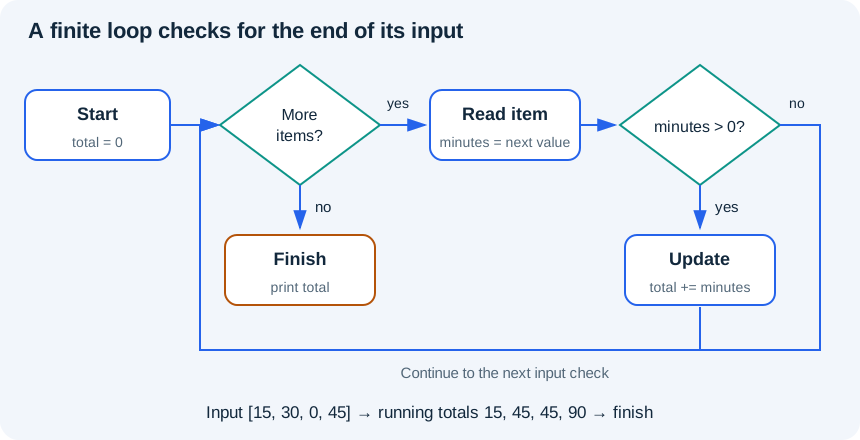
for minutes in [15, 30, 0, 45]: takes each item in order
and runs the indented body with minutes referring to that
item.
An accumulator stores a result as the loop progresses. Initialize it
before the loop; update it inside the loop. If you put
total = 0 inside the loop, the program forgets earlier
additions on every iteration. Empty input is also worth considering: an
accumulator initialized to zero remains zero if there are no
iterations.
Worked example
# Profile: Python basics
minutes_by_session = [15, 30, 0, 45]
total = 0
active_sessions = 0
for minutes in minutes_by_session:
    if minutes > 0:
        active_sessions = active_sessions + 1
        total = total + minutes
    else:
        print("Rest session")
print("Total minutes:", total)
print("Active sessions:", active_sessions)
for attempt in range(1, 4):
    print("Practice attempt", attempt)
# A while loop needs a condition that eventually becomes false.
remaining = 3
while remaining > 0:
    print("Countdown", remaining)
remaining = remaining - 1Trace total after each input: 15, 45, 45, 90.
active_sessions changes to 1, 2, stays 2, then becomes 3.
Zero follows the else branch and prints Rest session. The
final totals are 90 minutes and 3 active sessions.
range(1, 4) produces 1, 2 and 3. Its stop value is
excluded. range(3) produces 0, 1 and 2. It is often useful
for a known number of repeats. Use a direct loop over values when you
need the values themselves; do not add index arithmetic merely to make
the program look more advanced.
To record values as a loop runs, start with an empty list such as
countdown = [] and use
countdown.append(remaining) inside the loop.
append adds one item at the end; it changes that list. This
small list operation is enough for the countdown exercise, and Module 3
explores collections further.
A while loop repeats while its condition remains true.
The countdown moves from 3 to 2 to 1 to 0; at 0 the condition fails.
Forgetting the decrement creates an unbounded loop. In the browser, Stop
is the recovery control, but your final program should have a clear
stopping condition.
Conditions can be combined
and requires both conditions to be true; or
requires at least one; not reverses a boolean. For example,
minutes >= 0 and minutes < 30 includes rest and short
sessions. Write the rule in plain language first, then translate it. Do
not use if value == 1 or 2; the 2 is evaluated
separately as a truthy value. Use value == 1 or value == 2,
or later, value in [1, 2].
A break exits a loop immediately and
continue skips to its next iteration. Neither is needed for
these exercises. Prefer the clearest finite loop you can explain before
adding extra control paths.
Practice
- 2A: implement the four session labels in
exercises/02_control_flow.py. Test all six boundary inputs listed above. - 2B: sum only the strictly positive values in
[10, -5, 0, 25]. The answer is 35. Repeat with an empty list and with only negative numbers. - 2C: build
[3, 2, 1]with a while loop. Explain which variable makes the loop finish; then test a starting value of zero.
Add a matched boundary case
Keep the supplied 30→long case. In a separate scratch run, copy your
branch and set minutes = 0, with the expectation
assert label == "rest". Decide the expectation before
execution. Use this boundary table: -1→invalid, 0→rest, 1→short,
29→short, 30→long, 31→long. Save the original case so a new experiment
does not erase old evidence. After Module 4, you can put this branch in
a function and loop over input/expected pairs.
You may see total += value or
remaining -= 1 in an answer. These are short forms of
total = total + value and
remaining = remaining - 1 for these numeric variables. Use
the expanded form until the shorthand feels natural.
Exit check
Trace each iteration of your solution using a small table on paper:
current value, condition, accumulator. Why must the accumulator begin
before the loop? What is the last value produced by
range(2, 5)? Which boundary input would expose a mistaken
> where you needed >=?
Further reading
Back to contents3 · Collections and records
Outcome: choose a container and avoid unintended shared edits. Prerequisite: Module 2. Profile: Python basics. Time: about 2 hours.
Four useful shapes
A list stores a sequence: [20, 30, 15].
It keeps order, allows repeats and can change. A tuple
also stores a sequence, often for a small fixed grouping such as
(x, y); its own entries cannot be reassigned. A
dictionary maps unique keys to values:
{"topic": "python", "minutes": 25}. A set
stores unique elements and is useful for membership or deduplication
when order is not the purpose.
Choose from the question you need to answer. “What was the third session?” suggests an ordered sequence. “How many minutes are in this record?” suggests a named dictionary field. “Which topics occurred at least once?” suggests a set. No container is best for every problem.
Positions and keys are different
Python sequence indexing begins at zero: scores[0] is
the first item, and scores[-1] is the last. An out-of-range
position raises IndexError. Slicing selects a range:
scores[:2] gets the first two items because the stop
position is excluded. A slice beyond the end is tolerated, whereas an
individual invalid index is not.
Dictionary lookup uses a key, not a position.
record["minutes"] raises KeyError if the required key is
absent. record.get("notes", "not supplied") gives a
fallback for an optional field. Do not use a default of zero for a
required measurement simply to hide missing data; that changes the
meaning of the record.
Lists can contain dictionaries. This is a natural way to represent small tables before we introduce pandas. Each row is a record and each dictionary key names a field. A row's position and its identifier are separate concepts: sorting records changes positions but should not change identifiers.
Worked example
# Profile: Python basics
scores = [2, 4, 3]
copy_of_scores = scores.copy()
copy_of_scores.append(5)
print("Original:", scores)
print("Copy:", copy_of_scores)
print("First two:", scores[:2])
record = {"topic": "python", "minutes": 25}
print("Topic:", record["topic"])
print("Notes:", record.get("notes", "not supplied"))
counts = {}
for topic in ["python", "data", "python", "charts"]:
    counts[topic] = counts.get(topic, 0) + 1
print("Counts:", counts)
print("Unique topics:", sorted(set(["python", "data", "python"])))
point = (3, 5)
x, y = point
print("Point:", x, y)The original list remains [2, 4, 3]; the copy becomes
[2, 4, 3, 5]. Counts are python: 2,
data: 1, charts: 1. The sorted unique topic
list is ['data', 'python']. Set iteration is not the right
way to promise a display order, so we explicitly sort it.
The tuple assignment x, y = point is unpacking: two
values are assigned to two names in order. If their counts differ,
Python raises ValueError. Unpacking can clarify code, but only when the
structure is known.
Names can share an object
edited = original does not make a new list. Both names
refer to the same list; edited.append(40) is therefore
visible through original. For a list of numbers,
original.copy() creates a new outer list whose independent
additions do not affect the original.
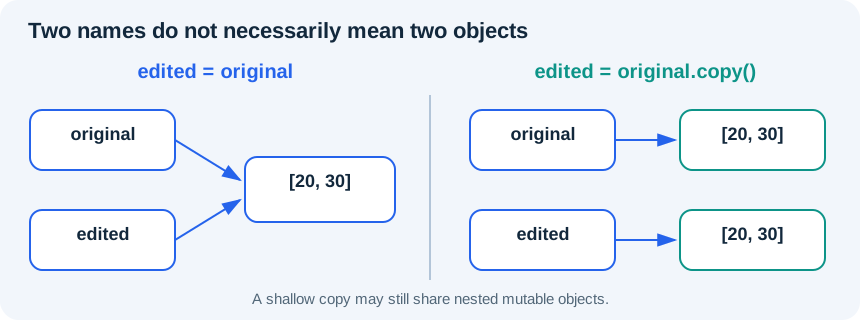
This is a shallow copy. If a list contains other mutable lists or dictionaries, those inner objects can still be shared. For this module, copy flat lists of immutable numbers or strings. Later code uses explicit copies at boundaries rather than assuming that assignment isolates data.
The counting pattern is worth tracing:
counts.get(topic, 0) supplies zero when the key is first
encountered; adding one creates the first count. Later occurrences read
the existing count and increase it. A dictionary preserves insertion
order, but that is not the same as alphabetic or numeric sorting.
Practice
- 3A: count
['python', 'data', 'python', 'charts', 'data']with a dictionary and loop. Explain the first and second updates forpython. - 3B: start with
[20, 30], create an independent outer list, append 40 and show both lists. First predict what would go wrong with plain assignment. - 3C: return a sorted list of unique topics. Explain why a set is appropriate here but would lose information if you needed the original number of sessions.
Use exercises/03_collections.py for the checks. Try
empty collections and a topic appearing once.
Choose, retrieve and explain
Before choosing code, choose the container and say why: an ordered history that may repeat a topic; one session with named topic/minutes fields; unique topic names; and a fixed pair of screen coordinates. More than one representation can work, but explain order, repetition, named lookup and intended mutability.
Now use
sessions = [{"topic": "python", "minutes": 20}, {"topic": "data", "minutes": 30}, {"topic": "charts", "minutes": 10}].
Retrieve the second session's minutes, slice the first two sessions, and
unpack (4, 7) into x and y.
Predict the types as well as the values. Check your explanations in the
separate answer guide.
For the nested-copy exit question, trace this small counterexample:
original = [{"minutes": 20}]
copied = original.copy()
copied[0]["minutes"] = 99
print(original[0]["minutes"])  # 99: the inner dictionary is shared
pair = ([1, 2], "label")
pair[0].append(3)
print(pair[0])  # [1, 2, 3]: tuple entries are fixed, but this entry is a list
The outer collection's mutability and an inner object's mutability are separate questions. Independent nested copies are beyond the required flat-list exercises; this trace explains the limitation rather than asking you to guess it.
Exit check
Why is record["minutes"] different from
scores[0]? When would using .get(..., 0) be
misleading? Does a tuple guarantee every object inside it is immutable?
Why can a shallow copy still share an inner dictionary?
Further reading
Back to contents4 · Functions and modules
Outcome: write a small reusable function with a clear contract. Prerequisite: Module 3. Profile: Python basics. Time: about 2 hours.
Give a transformation a name
A function packages instructions behind a name. Its parameters
describe the values it expects, and its return value is the result it
hands back. def minutes_to_hours(minutes): defines a
function with one parameter. minutes_to_hours(90) calls it
with an argument, 90. Defining a function does not run its body; calling
it does.
Separate calculation from presentation. A function that returns 1.5 can be used in another calculation, a message or a chart. A function that only prints 1.5 usually returns None, so its caller has no numeric result to reuse. You can print a returned value at the edge of the program, after the calculation is finished.
A good contract answers three questions: what inputs are allowed, what output is returned, and what happens for invalid or empty input? Our conversion accepts a non-negative number of minutes and returns hours. Negative minutes raise ValueError. We assume the caller supplies a number; we do not claim the function validates every possible Python object.
Worked example
# Profile: Python basics
import math


def minutes_to_hours(minutes):
    """Convert a non-negative number of minutes into hours."""
    if minutes < 0:
        raise ValueError("minutes must be non-negative")
    return minutes / 60


def total_minutes(sessions):
    """Return the sum; an empty collection has total zero."""
    return sum(sessions)


print("Hours:", minutes_to_hours(90))
print("Total:", total_minutes([20, 30]))
print("Rounded up:", math.ceil(minutes_to_hours(95)))
# print displays a value; return hands a value back to the caller.The first call returns 1.5. The second returns 50. The last call uses
the standard-library math.ceil function to round 95/60
upward to 2. import math makes the module available under
its name; the dot selects its ceil function. A module is a
reusable unit of Python code, often a .py file.
The triple-quoted text inside a function is its docstring. It
describes purpose and assumptions. It does not enforce the rule: the
if and raise statements do.
raise ValueError(...) deliberately reports that a value is
unacceptable. We introduce it here to make the contract explicit; Module
5 explains how a caller can handle this expected failure.
Local names and returned values
A parameter and names assigned inside a function normally belong to that function call. This local scope makes small functions easier to reason about. Avoid making a calculation depend on a changeable global variable when you can pass that input explicitly.
For example, prefer a function taking both quantity and
unit_price_cents over a function that quietly reads a price
set somewhere else in the program. The explicit version is easier to
test and reuse with a different price.
return finishes the current function call immediately.
Code after it in the same path does not run. If execution reaches the
end without return, Python returns None. You can return a dictionary to
give several results names:
{"count": len(values), "total": sum(values)}. For an empty
list, the count and sum are both zero; an average needs a different
policy because division by zero is undefined.
Trace a call without a hidden dependency
len(values) returns the number of items;
sum(values) adds the numeric items and returns zero for an
empty collection. They are built-in functions, so no import is needed.
In the next example, the caller's price is 100, but the
call supplies 30 as the function's price parameter. The
call returns 60, and the caller's name still holds 100. Rebinding the
caller's price to 500 does not change the result of a later call that
explicitly supplies 30.
# Profile: Python basics. A parameter belongs to this call.
price = 100

def quoted_total(quantity, price):
    return quantity * price

print("Quoted total:", quoted_total(2, 30))
print("Caller price:", price)
price = 500
print("Same explicit quote:", quoted_total(2, 30))For the negative-duration test, run minutes_to_hours(-1)
separately after your valid cases. Expect a visible ValueError and no
numeric result. Do not append it before checks you still want to
execute, because an unhandled error stops the run. Module 5 teaches how
to catch that expected failure; you do not need to invent try/except
yet.
Importing your own code
For an optional local exercise, open
examples/time_tools.py and
examples/04_local_import.py. The first defines a function
without printing anything. The second imports it and prints a result.
Run python examples/04_local_import.py from the course
folder. Python can find the neighboring module when that script
runs.
Do not name your own file math.py, csv.py,
numpy.py or pandas.py; it can shadow the real
module and create confusing import errors. The browser course uses a
single code editor, so keep function definitions and calls in one pasted
file. Multi-file import behavior in that lab is not required or
claimed.
All required functions take explicit inputs. Default arguments are an optional later topic, not a skill you need to infer from these exercises.
Practice
- 4A: implement
minutes_to_hours, including its negative-input error. Check 0, 30, 90 and -1. - 4B: implement
summarize_minutes(values)returning a count and total. Check empty input and[15, 45]. - 4C: call both functions to summarize
[15, 45]and convert its total to hours. Print the result outside the functions. As an optional local extension, move the functions to your own module and import them.
Use exercises/04_functions.py; the NotImplementedError
is a reminder to write the function, not a hidden answer.
Exit check
Explain parameter versus argument and print versus return. Why should the behavior for an empty list be decided before implementation? How would a function depending on an unseen global price become harder to test?
Further reading
Back to contents5 · Files, CSV and errors
Outcome: parse a small CSV without hiding bad rows. Prerequisite: Module 4. Profile: Python basics. Time: 2–3 hours.
Text is not yet validated data
A CSV is text representing rows and fields. A header names the
fields, and later rows carry values. Those values arrive as text even if
a column is called minutes. Parsing gives structure;
validation determines whether the structure and values satisfy your
task's rules. These are separate responsibilities.
Do not parse general CSV with line.split(","): a quoted
field may contain a comma or a newline. Python's csv module
understands CSV quoting rules. csv.DictReader uses the
header to create a dictionary for each row, which makes
row["minutes"] more readable than remembering a column
number.
For browser practice we use StringIO, a file-like object
backed by text in memory. It lets you practice a file-reading interface
without relying on browser uploads or filesystem persistence. The same
CSV reader can later consume a real opened file. StringIO is not a
permanent saved file.
Errors belong in the design
A SyntaxError prevents Python from understanding the code. Runtime exceptions such as ValueError, KeyError and FileNotFoundError happen when an operation cannot complete during execution. A logic error may produce plausible output with no exception at all.
Use try around the operation whose expected failure you
can actually handle. except ValueError here means an
invalid numeric field should be recorded and the next row processed. It
does not mean every problem should be ignored. A bare
except: or an except Exception: pass would
hide spelling errors, missing columns and other defects that deserve
attention.
Worked example
# Profile: Python basics. StringIO gives the CSV reader file-like text.
import csv
from io import StringIO

csv_text = "topic,minutes\npython,20\ndata,not recorded\ncharts,30\n"
accepted = []
rejected = []
with StringIO(csv_text) as source:
    for line_number, row in enumerate(csv.DictReader(source), start=2):
        try:
            minutes = int(row["minutes"])
            if minutes < 0:
                raise ValueError("minutes must be non-negative")
        except ValueError:
            rejected.append({"line": line_number, "raw": row["minutes"]})
        else:
            accepted.append({"topic": row["topic"], "minutes": minutes})
print("Accepted:", accepted)
print("Rejected:", rejected)
print("Accepted minutes:", sum(row["minutes"] for row in accepted))Expected accepted rows are python/20 and charts/30. The rejected
record preserves the text not recorded and line 3,
including the header as line 1. The accepted total is 50. We have not
decided that the rejected session lasted zero minutes; its duration
remains unknown.
The with block closes its file-like object when the
block exits. enumerate(..., start=2) supplies row labels
beginning after the header. These line numbers work for this simple
single-line-per-record fixture; for arbitrary CSV with quoted embedded
newlines, call them record positions or use the reader's physical line
tracking instead.
The final sum contains a generator expression:
row["minutes"] for row in accepted supplies one value per
accepted row to sum. It is a compact version of the
accumulator loop you already know. If it is unfamiliar, rewrite it as
total = 0 followed by a loop adding each row's minutes; the
result must match.
else after try/except runs only when the try block
completed without the handled exception. That makes the accepted path
clear. If the conversion succeeds but the value is negative, we raise
ValueError ourselves because the input breaks our rule. A negative
number is valid Python text but an invalid duration under this task's
contract.
A safe local file pattern
The optional examples/05_local_files.py reads
datasets/study_sessions.csv using Path and
with source_path.open(encoding="utf-8", newline=""). UTF-8
makes the text encoding explicit; newline="" lets the CSV
module handle newlines. The file is located relative to the script's
directory rather than wherever a terminal happened to start.
The script writes only outputs/session_summary.txt.
Writing with replacement mode overwrites that destination, so generated
outputs belong in their own folder and raw input should be preserved.
The included sample has 180 minutes. Run it twice and inspect both the
raw CSV and output: the raw source should be unchanged, and the summary
should be reproducible.
Worked export: a small supplies list
Here is a separate export example before you build the session
exporter. fieldnames specifies the column names and their
order. writeheader() writes those names as the first CSV
row. writerows(rows) writes each dictionary using that
order.
# Profile: Python basics. An unrelated export example for Module 5C.
import csv
from io import StringIO

rows = [{"item": "pencils, blue", "count": 2}]
buffer = StringIO()
writer = csv.DictWriter(buffer, fieldnames=["item", "count"])
writer.writeheader()
writer.writerows(rows)
exported_text = buffer.getvalue()
buffer.close()
print(exported_text)StringIO stores text in memory. Its
getvalue() method returns all text written so far as an
ordinary string; call it before closing the buffer. Closing the buffer
does not destroy the string already returned. The output is:
item,count
"pencils, blue",2
The quotes around pencils, blue keep the embedded comma
inside one field. DictWriter handles that quoting for you; do not
concatenate fields manually. Exercise 5C uses the same sequence with
different column names and the accepted session rows. A JSON file is
another useful format for structured records, but it is not needed for
this project.
Practice
- 5A: write
parse_minutes(raw)using integer conversion and a non-negative check. Accept"0"and" 20 "; reject"unknown","2.5"and"-1". - 5B: complete
read_sessionsin the starter. Return accepted dictionaries and a separate rejection list retaining original text and record position. The fixture has two accepted and two rejected rows, totaling 20 accepted minutes. - 5C: write accepted rows back to a StringIO CSV using DictWriter. Read that text again and verify its fields. Test a topic containing a comma to check that quoting survives the round trip.
Exit check
Why is “readable as an integer” different from “allowed by the task”? Why would replacing missing minutes with zero misrepresent the data? Which error should remain visible if a required header is missing? How does a context manager help when an exception occurs halfway through reading?
Further reading
Back to contents6 · Debugging and tests
Outcome: reproduce a defect, isolate its cause and keep a regression test. Prerequisite: Module 5. Profile: Python basics. Time: about 2 hours.
Debug with a question
Debugging is a process of narrowing explanations. Start with an exact
input, expected output and actual output or error. “It does not work”
gives you nowhere to begin. “For [10, 0, 20], I expected
two active sessions but got one” points toward counting behavior.
Read a traceback from its final line first: it names the exception
and message. Then inspect the referenced line in your own code, and the
calls leading to it. The line that fails may expose a value created
incorrectly earlier. Printing repr(value),
type(value) and a small intermediate result can reveal
whitespace, the wrong type or an accumulator reset.
Reduce the failing example while preserving the failure. A three-item list is easier to trace than a thousand rows. Change one relevant thing, rerun the reproducer and then rerun the checks that used to pass. If you make five unrelated changes, you lose evidence about which one fixed the problem.
Tests are executable expectations
A test gives known input and checks an observable result. An ordinary case is useful, but boundaries and failure cases often reveal more: an empty list, one item, all zeros and an invalid value. Choose those cases from the function's contract, not simply from the values you happen to have today.
An assertion fails when its condition is false. It is convenient for exercises, but Python can disable assertions with optimization flags. Do not use assert as the only validation for user input or a production safety rule. Use explicit checks and exceptions for the contract, and a testing framework for repeatable test execution.
Worked example
# Profile: Python basics. These checks run in the normal interpreter.
import math


def mean_minutes(values):
    """Return the arithmetic mean; empty input is an error."""
    if not values:
        raise ValueError("at least one value is required")
    return sum(values) / len(values)


assert math.isclose(mean_minutes([10, 20, 30]), 20.0)
assert math.isclose(mean_minutes([12]), 12.0)
assert math.isclose(mean_minutes([0, 0]), 0.0)
try:
    mean_minutes([])
except ValueError:
    print("Empty-input check passed")
else:
    raise AssertionError("empty input should raise ValueError")
print("Three numeric checks passed")Expected messages are Empty-input check passed and
Three numeric checks passed. math.isclose
handles tiny representation differences in approximate numeric values.
Exact integer counts and text can usually use direct equality.
rel_tol is a relative allowance scaled by the magnitude of
the values; abs_tol is an absolute allowance useful near
zero. For these tiny deterministic arithmetic checks, use
math.isclose(a, b, rel_tol=1e-9, abs_tol=1e-12). The
defaults are not a measurement policy: choose tolerances from the
problem. For example,
math.isclose(1e-13, 0.0, rel_tol=1e-9, abs_tol=1e-12) is
true because of the absolute allowance; 0.31 versus 0.3 is false with
these tolerances.
For this list contract, if not values means the same as
if len(values) == 0: an empty list is false in a condition
and a nonempty list is true. This shorthand does not validate the type
of every possible object.
The empty-input test is important. Returning 0 as the mean of no observations would look like a real measurement. Our contract raises ValueError instead. Another application might choose None, but it must state that policy and make callers handle it.
Investigate a wrong result before reading its explanation
The starter's function is meant to count strictly positive values.
For [10, 0, 20], write the expected result, then run it and
record the actual result. Find a shorter input that still fails. Trace
count after each executed line, propose one change and
explain why it should help before editing. Keep that smallest failing
input as a regression test. Finally, run an empty list and record any
different failure.
Use exercises/06_diagnostic_worksheet.md to capture your
evidence. The diagnosis is in the separate answer guide; leave it closed
until you have tried the trace. A useful hint is to compare what happens
on the first and second loop iterations, without adding a new
condition.
Do not change expected answers to match broken output. Change an expectation only when its paired input or agreed contract changes, and retain the old case.
Read a traceback from another failure
The following example deliberately converts the text
"twenty" with int. It catches the planned
error only to display the traceback and let this teaching script finish.
Your own data-processing function must still decide whether to reject
the record or stop.
# Profile: Python basics. This demonstration catches and prints its planned failure.
import sys
import traceback

def hours_from_text(text):
    minutes = int(text)
    return minutes / 60

raw_minutes = "twenty"
try:
    print(hours_from_text(raw_minutes))
except ValueError:
    traceback.print_exc(file=sys.stdout)
print("The demonstration stopped the invalid conversion; no hours were produced.")The relevant traceback looks like this (directory paths shortened):
Traceback (most recent call last):
  File ".../06_traceback.py", line 11, in <module>
    print(hours_from_text(raw_minutes))
  File ".../06_traceback.py", line 6, in hours_from_text
    minutes = int(text)
ValueError: invalid literal for int() with base 10: 'twenty'
Read the output in three passes:
- The final
ValueError: invalid literal for int() with base 10: 'twenty'states the failed conversion and the actual value. - The frame containing
minutes = int(text)identifies the failing operation. Division by 60 has not happened yet. - The earlier call
hours_from_text(raw_minutes)leads back to the assignment that supplied"twenty". Inspect that input rather than changing the division.
File paths and line numbers depend on where you run the downloaded
script; the call chain and failed value are the useful evidence. For a
follow-up, change only the source to "20minutes": identify
the failed operation, actual input and likely upstream field to inspect.
Then try "20" and explain why it succeeds. Record the
explanation before opening the answers.
A repeatable local test command
This package uses Python's standard-library unittest so
tests do not require another package. From the course root, run
python -m unittest discover -s tests -v with your course
virtual environment's Python. The suite tests reference solutions, the
dataset policy and regressions. A green reference suite does not grade
your edited starter automatically. The readiness checker explicitly
imports your own readiness functions.
A framework reports each test and groups failures. Read the first relevant failure, fix the cause, then rerun the full suite. Passing tests are evidence for the cases checked, not proof that the program works for every possible input, environment or dataset.
Practice
- 6A: fix
count_activeinexercises/06_debug_tests.py. First demonstrate the bug with[10, 0, 20], then test empty input,[0]and[7]. - 6B: implement
mean_minuteswith the empty-input error. Test a single value, all zeros and[10, 20, 30]. - 6C: use approximate comparison to check
0.1 + 0.2against0.3. Add an explicit negative test showing that 0.31 should not be considered close at a tight tolerance. Explain what each test guards.
Exit check
What is the smallest input that exposes the counting bug? How is a
regression test different from printing the answer once? Your tests pass
for [10, 20, 30] and [12]. Which behavior is
still untested? Choose a new input from the contract, predict its result
and explain which mistake that test could catch.
Further reading
Back to contents7 · NumPy arrays
Outcome: explain shape and axes, apply elementwise operations and make an independent copy. Prerequisite: Modules 0–6 or readiness diagnostic. Profile: Data · NumPy and pandas. Time: about 2 hours.
Why another container?
Python lists are flexible general-purpose collections. NumPy arrays
provide a regular numerical structure and operations that work across
it. Instead of writing a loop to divide each duration by 60, an array
can express minutes / 60 directly. This is called an
elementwise operation: each element is transformed. It is clearer for
many numerical tasks, but does not excuse misunderstanding the
underlying operation.
A normal numeric array has a shared dtype, such as an integer or floating-point type. Mixing numbers and arbitrary text can lead to an unsuitable dtype and surprising behavior. Choose a numerical dtype deliberately when the task calls for numerical work. An array of zeros is data; an array containing NaN includes missing/invalid floating-point values, which ordinary reductions may propagate. Do not silently substitute zero for missing observations.
Shape answers “how is it arranged?”
Our example has two days and three topics per day. Its shape is
(2, 3), its number of dimensions is 2 and its number of
elements is 6. Index [0, 1] selects day 0, topic 1. The
first dimension is rows in this two-dimensional example; the second is
columns.
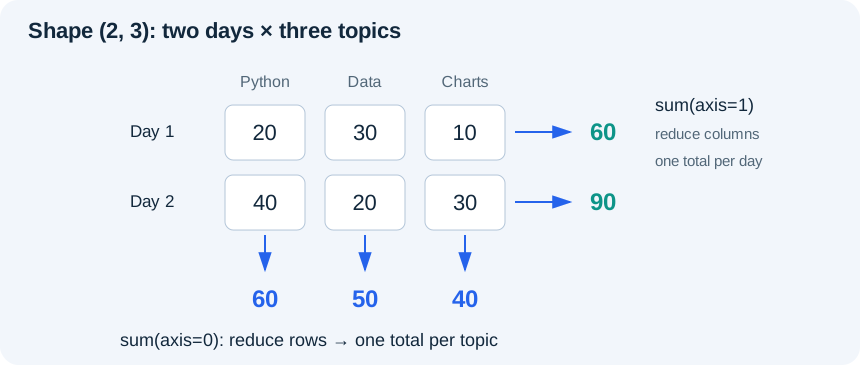
An axis argument says which dimension is reduced.
sum(axis=0) combines the two rows and leaves three topic
totals. sum(axis=1) combines the three columns within each
row and leaves two day totals. Check the output shape before deciding
that you used the right axis. A correct-looking number in the wrong
orientation can lead to a misleading analysis.
Worked example
# Profile: Data · NumPy and pandas
import numpy as np

minutes = np.array([[20, 30, 10], [40, 20, 30]], dtype=float)
print("Shape:", minutes.shape)
print("Each day's total:", minutes.sum(axis=1).tolist())
print("Each topic's total:", minutes.sum(axis=0).tolist())
print("Hours:", (minutes / 60).round(2).tolist())
print("At least 30 minutes:", minutes[minutes >= 30].tolist())
# Basic slicing can share memory. Copy before making independent edits.
first_day_copy = minutes[0].copy()
first_day_copy[0] = 99
print("Original first value:", minutes[0, 0])Expected day totals are [60.0, 90.0]; topic totals are
[60.0, 50.0, 40.0]. The threshold mask selects
[30.0, 40.0, 30.0]. The first original value remains 20.0
after editing the explicit copy.
The comparison minutes >= 30 produces a Boolean array
with the same shape. Indexing with that mask selects matching values.
This is filtering, not replacing values: the result contains only the
selected entries. Combine NumPy masks using & and
|, with parentheses around each comparison; Python's scalar
and and or are not the same operation on an
array.
Dividing an array by the scalar 60 applies the operation to every
element. This simple broadcasting is enough for this course. When
combining two non-scalar arrays, shapes must be compatible; accidental
broadcasting can create a larger result than intended. Always inspect
.shape. Matrix multiplication is a separate operation from
elementwise multiplication and belongs in later study, not in this
introductory data summary.
Copies and views
A basic NumPy slice can be a view sharing the original array's data.
first_day = minutes[0] does not guarantee an independent
row. Changing first_day[0] may change
minutes[0, 0]. Use .copy() when independent
edits are intended. Not all indexing operations return views; the useful
habit is to reason about ownership instead of assuming every selection
copies.
The function np.array_equal checks exact array contents;
np.allclose compares approximate numeric arrays within a
tolerance. For tests involving division, allclose is often appropriate.
For exact integer selections and shapes, direct exact checks are more
informative. Choosing a comparison does not solve a missing-value
policy; state that separately.
Contrast and transfer
Python list multiplication repeats entries: [10, 20] * 2
becomes [10, 20, 10, 20]. NumPy numeric multiplication
transforms entries: np.array([10, 20]) * 2 becomes an array
containing 20 and 40. Compare lengths and values, not just how compact
the expressions look.
For a new non-square practice array, use
[[15, 30, 45], [20, 40, 60]]. Before running, predict the
shape and values after summing over axis 0 and axis 1. Convert the array
to hours and check the result with
np.allclose(hours, [[0.25, 0.5, 0.75], [1/3, 2/3, 1.0]]).
This checks approximate division results; array_equal
remains suitable for the exact integer totals.
Optional dtype/missing-value experiment: inspect
np.array([1, "2"]).dtype, then try to add the number 1 and
read the error. Next compare np.mean([1.0, np.nan]) with
np.nanmean([1.0, np.nan]). The second deliberately excludes
a missing observation; it does not recover its value. State that
exclusion before interpreting the result. These are awareness checks,
not a comprehensive missing-array policy.
Practice
Complete exercises/07_numpy.py.
- 7A: for
[[10, 40], [20, 50]], compute row totals[50, 70]and column totals[30, 90]. Explain each axis in words. - 7B: select values at least 40 with a Boolean mask. Test a threshold that selects nothing and inspect the resulting shape.
- 7C: copy the first row, change its first value to
99 and prove the original still starts with 10. Then deliberately repeat
without
.copy()in a scratch run to observe the difference.
Exit check
What is the shape of a two-row, three-column array after summing over
axis 1? Why is values * 2 different for a Python list and a
NumPy numeric array? Which kind of edit needs a copy, and why might
changing a view be useful when it is deliberate?
Further reading
Back to contents8 · pandas tables
Outcome: inspect, normalize and validate a small table while preserving rejected rows. Prerequisite: Module 7. Profile: Data · NumPy and pandas. Time: 2–3 hours.
Rows, columns and labels
A DataFrame is a labelled table. A Series is one labelled column-like
collection. frame["minutes"] selects a Series;
frame[["topic", "minutes"]] selects a DataFrame. An index
labels rows; it is not automatically a business identifier. After
filtering, labels may have gaps. Use .loc for label- or
Boolean-based selection and .iloc for positional selection;
do not assume position 0 and label 0 always identify the same row.
Before changing data, inspect head(),
shape, dtypes and missing-value counts.
len(frame) counts all rows;
frame["minutes"].count() counts non-missing values in that
column, so they need not agree. Ask what one row represents, what fields
mean, which keys should be unique and what values are allowed. A tool
cannot infer all of these business rules from column names. For our
simple session table one row is one recorded practice session, and
minutes must be a whole non-negative count.
Inspect first, then decide
Run this five-row fixture before deciding what to clean.
head(2) shows two source records, shape gives
rows and columns, and dtypes describes the stored column
types. Text types are expected because we preserved the source. The
first sample reveals whitespace around Python and an empty
duration; neither fact can be inferred from a column name alone.
# Profile: Data · NumPy and pandas. Inspect before deciding what to clean.
from io import StringIO
import pandas as pd

text = "topic,minutes\n Python ,20\ndata,\ncharts,unknown\n,10\ndata,-5\n"
raw = pd.read_csv(StringIO(text), dtype="string", keep_default_na=False)
print("Raw shape:", raw.shape)
print("First two source rows:\n" + raw.head(2).to_string())
print("Raw column types:\n" + raw.dtypes.to_string())
print("Raw missing counts:", raw.isna().sum().to_dict())
print("Empty source minute strings:", int(raw["minutes"].eq("").sum()))
clean = raw.copy()
clean["topic"] = clean["topic"].str.strip().str.lower()
clean["minutes"] = pd.to_numeric(clean["minutes"], errors="coerce")
print("Rows / numeric values:", len(clean), int(clean["minutes"].count()))
print("Converted missing minutes:", int(clean["minutes"].isna().sum()))
print("Negative minutes:", int(clean["minutes"].lt(0).sum()))
print("Empty topics:", int(clean["topic"].eq("").sum()))
valid = clean["topic"].ne("") & clean["minutes"].notna() & clean["minutes"].ge(0)
print("Valid mask:", valid.tolist())
print("Inverse mask:", (~valid).tolist())
print("Accepted source labels:", clean.loc[valid].index.tolist())
# A gapped index shows the distinction between labels and positions.
gapped = raw.loc[[0, 3]].copy()
print("Gapped labels:", gapped.index.tolist())
print("Second positional row equals label 3:", gapped.iloc[1].equals(gapped.loc[3]))The raw shape is (5, 2). Both columns are string
columns. Raw missing counts are zero, yet one minute field is an empty
string: keep_default_na=False preserved that string instead
of automatically converting it to a missing marker. After numeric
conversion, only three of five duration fields are numbers. Empty text
and unknown become two missing numeric values; the negative
value remains numeric but violates the policy.
There is also one empty topic. In this fixture those three failure sets do not overlap: two failed conversions, one negative duration and one empty topic account for four rejected rows, leaving label 0. In another fixture they may overlap, so adding per-rule counts does not automatically give a unique rejected-row count. Compute the combined mask.
The accepted mask is [True, False, False, False, False].
The ~ operator inverts each Boolean decision, giving
[False, True, True, True, True]. Use the first on the
working table and the inverse on the original table to retain rejection
evidence. Both selections use the same source labels.
The final experiment selects labels 0 and 3. Its second positional
row is .iloc[1], while the same row by source label is
.loc[3]. .loc[1] would ask for a label that is
absent. This distinction matters when a later reason refers back to a
source row.
Before the cleaning exercise, complete
exercises/08_inspection.py on its different five-row
fixture. Write three observations and a next action for each before
editing the data. Predict failed conversions, negative values and empty
topics, then compare those predictions with the combined rejection mask.
Do not merely paste the inspection method names.
Raw data is evidence
Read source fields as strings when you need to preserve their exact
text for review. Our example uses dtype="string" and
keep_default_na=False; this keeps tokens such as
"unknown" and empty fields visible instead of interpreting
every source token as a numeric value or default missing marker. Those
options are deliberate for this fixture, not a universal ingestion
rule.
Make a working copy. Trim and lowercase categories, then convert
numeric fields with pd.to_numeric(..., errors="coerce").
Invalid numeric text becomes missing in the working column. That
conversion does not decide what to do with the record. A Boolean
validity rule separates accepted rows from rejected rows, while the
rejection export retains the source values.
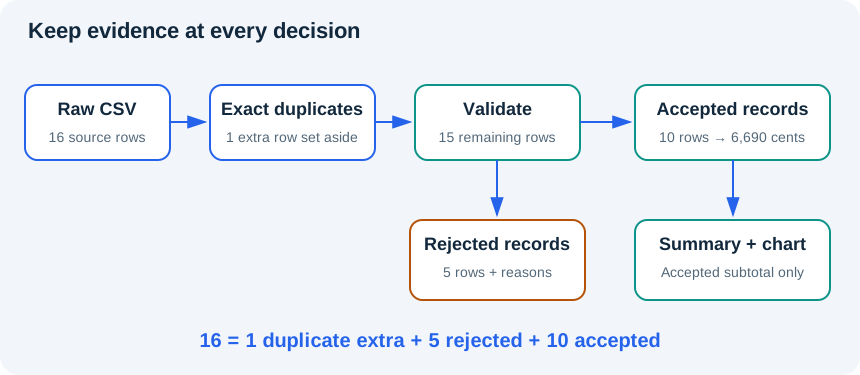
Worked example
# Profile: Data · NumPy and pandas
from io import StringIO
import pandas as pd

csv_text = "topic,minutes\n Python ,20\ndata,30\npython,25\ncharts,unknown\n"
raw = pd.read_csv(StringIO(csv_text), dtype="string", keep_default_na=False)
clean = raw.copy()
clean["topic"] = clean["topic"].str.strip().str.lower()
clean["minutes"] = pd.to_numeric(clean["minutes"], errors="coerce")
valid = clean["minutes"].notna() & clean["minutes"].ge(0)
accepted = clean.loc[valid].copy()
rejected = raw.loc[~valid].copy()
summary = accepted.groupby("topic", as_index=False)["minutes"].sum()
summary = summary.sort_values("topic")
print(summary.to_string(index=False))
print("Rejected rows:", len(rejected))
print("Accepted total:", int(accepted["minutes"].sum()))The summary has data/30 and python/45. One row is rejected, and
accepted minutes total 75. The result describes accepted records only.
It cannot tell you how much time the unknown charts session
took. Replacing that value with zero would turn an unknown measurement
into an invented one.
groupby("topic", as_index=False)["minutes"].sum() groups
rows by topic and adds the values within each group.
as_index=False keeps the group key as an ordinary column.
.sort_values("topic") makes the display order explicit.
Aggregation changes the grain: the result now has one row per topic
instead of one row per session. Do not describe the number of summary
rows as the number of practice sessions.
Build a stronger validity rule
The small worked example checks that minutes are present and
non-negative. Your exercise adds two requirements: a nonempty normalized
topic and whole-number minutes. The mask combines notna(),
.ge(0) and .mod(1).eq(0) for the numeric
field, plus .ne("") for the topic. The modulo condition
checks that no fractional remainder remains; it does not silently
truncate 1.5 to 1.
Use parentheses around comparisons and & or
| to combine Series masks. Avoid chained assignment such as
frame[mask]["minutes"] = 0. Instead, write a single
.loc[mask, "minutes"] assignment to the intended frame, or
work on an explicit .copy(). pandas' copy behavior has
evolved across versions; the course uses explicit assignments that work
in the tested local and browser versions without depending on ambiguous
chained edits.
A missing record and a duplicate record are different issues. Exact duplicate removal should use an explicit policy. A repeated identifier with conflicting contents needs investigation rather than an arbitrary “keep first” choice. We address that in the capstone, together with count reconciliation.
Practice
- 8A: complete
clean_session_tableusing the stronger rules above. The seven-row exercise fixture should yield three accepted and four rejected rows. Preserve original text in rejected records. - 8B: group accepted minutes by normalized topic, sort the result and check data/30 and python/45. Reconcile seven input rows with three accepted plus four rejected.
- 8C: write one limitation and one question for the data owner. For example, ask whether missing durations can be recovered; do not assume they were zero. Explain whether it is safe to compare total learning between topics from this sample.
Exit check
What changed between parsing and validation? What is the grain before
and after grouping? Why is count() sometimes different from
row count? How could a missing-value default make a plausible but false
summary? Explain how your reject list lets another person review the
decision.
Further reading
Back to contents9 · Charts that answer a question
Outcome: create an interpretable chart and describe its limits. Prerequisite: Module 8. Profile: Charts · Matplotlib. Time: about 2 hours.
Start with the question
A chart is a compressed argument about data. Decide the question first, then choose marks and labels that help answer it. A bar chart compares categories. A line chart shows an ordered sequence such as measurements over time. A scatter plot shows paired numeric values without proving that one causes the other. A histogram groups numeric observations into bins to show a distribution.
Our question is narrow: how many recorded practice minutes belong to each topic in six synthetic sessions? The counts are Python 80, Data 70 and Charts 30. A bar chart makes these category totals easy to compare. It does not establish learning quality, effort, mastery or the effect of a teaching method.
A bar's length represents a magnitude, so a zero baseline is the sensible default for this chart. Cropping the baseline can exaggerate modest differences. A line chart's scale may serve a different purpose, but it still needs clear units and an honest range. Avoid 3D effects, crowded legends and color choices that carry meaning you have not explained.
Matplotlib's two useful objects
A Figure is the overall canvas. An Axes is a plotting area within it.
fig, ax = plt.subplots(...) creates both. Plot through
ax, set labels and titles explicitly, and keep the Figure
when you want to save a file. figsize is measured in
inches; output pixels also depend on resolution.
layout="constrained" helps leave room for labels, but you
must still inspect the rendered result.
Worked example
# Profile: Charts · Matplotlib
import matplotlib.pyplot as plt

topics = ["Python", "Data", "Charts"]
minutes = [80, 70, 30]
fig, ax = plt.subplots(figsize=(6, 3.5), layout="constrained")
ax.bar(topics, minutes, color=["#2563eb", "#0d9488", "#d97706"])
ax.set(title="Practice time by topic (synthetic sessions)",
       xlabel="Topic", ylabel="Minutes", ylim=(0, 90))
ax.spines[["top", "right"]].set_visible(False)
for topic, value in zip(topics, minutes):
    ax.text(topic, value + 2, str(value), ha="center")
fig.savefig("practice_minutes.png", dpi=160)
# The lab captures the chart and offers a download. Locally, open the PNG.
# For an interactive local window, optionally call plt.show() afterward.The chart should show three bars of heights 80, 70 and 30, with the exact values printed above them. The vertical label states minutes; the title declares the data synthetic. Removing the top and right borders is cosmetic, not a statistical operation. The baseline still starts at zero.
The lab's Charts profile has Matplotlib and NumPy; do not assume it also includes pandas. The required example uses simple Python lists so it runs in that profile. In the capstone you will first calculate a summary in the Data profile, then paste the verified summary into the separate Charts script. The local route can combine all three packages in one process.
The worked label loop uses zip(topics, minutes) to pair
one topic and one height on each iteration: Python with 80, Data with
70, Charts with 30. These lists must have equal lengths for this task;
zip otherwise stops at the shorter list, which could hide
an unmatched label or value.
Choose a chart and handle changed values
Choose a chart for each new question before seeing the answer: compare counts across three product categories; show daily recorded durations across a week of actual dates; inspect whether paired session duration and exercise count vary together. State what the chart can show and one conclusion it cannot support.
The earlier upper limit 90 fits the current largest value 80. Change
that value to 140 and predict what will be clipped. A reusable chart
needs a limit based on current data. The following expanded loops
convert cents into display units and find the largest value. Starting
the largest value at zero is appropriate because these validated
subtotals are non-negative. max(1.0, largest * 1.2) leaves
20% headroom and a nonzero range for all-zero or empty input.
# Profile: Charts · Matplotlib. Choose a safe display range from current data.
import matplotlib.pyplot as plt

def chart_values(labels, cents):
    if len(labels) != len(cents):
        raise ValueError("each label needs one value")
    values = []
    for amount in cents:
        values.append(amount / 100)
    largest = 0.0
    for value in values:
        if value > largest:
            largest = value
    upper = max(1.0, largest * 1.2)
    fig, ax = plt.subplots(figsize=(6, 3.5), layout="constrained")
    ax.bar(labels, values, color="#2563eb")
    ax.set(title="Synthetic accepted subtotal", xlabel="Category",
           ylabel="Fictional currency units", ylim=(0, upper))
    if len(values) == 0:
        ax.text(0.5, 0.5, "No accepted records", transform=ax.transAxes,
                ha="center")
    total = sum(cents) / 100
    print(f"Subtotal: {total:.2f}; y-axis upper bound: {upper}")
    return fig, ax

fig, ax = chart_values(["Pens", "Paper"], [14000, 2000])
assert ax.get_ylim()[1] > 140
fig.savefig("changed_values.png", dpi=160)
# Run again with labels=[], cents=[], or with two zero values. Explain each.For the empty-message label, transform=ax.transAxes
makes (0.5, 0.5) the center of the plotting area: each coordinate runs
from 0 to 1 across that area, independently of the data scale. You can
reuse this display line without changing the data.
The changed values 140 and 20 have a displayed total of 160.00 and an
upper bound of 168. The format :.2f displays two decimal
places; it does not change the numeric value. The capstone's shorter
[amount / 100 for amount in cents] is a list comprehension
equivalent to the conversion loop. Its
max(values, default=0) returns zero only when the
collection is empty; it is the compact version of the non-negative
maximum loop shown here.
Try empty labels/values and then two zero values. Empty means there are no accepted records; zero-valued bars mean accepted records exist but their subtotal is zero. The code labels the empty case explicitly instead of treating it as observed zero activity. Keep these meanings separate in your caption. The chart checks and the independent data-validation checks answer different questions.
Save and inspect
fig.savefig("practice_minutes.png", dpi=160) writes the
figure. The Aabha lab captures charts as downloadable images; check
Chart output and keep the image separately from your downloaded code.
Locally, open the saved PNG. plt.show() is optional for an
interactive local window; the lab uses a non-interactive backend, so
calling it there can warn even when the chart is captured. A saved file
is not automatically a complete deliverable: inspect it for clipped
text, missing fonts, wrong labels and unreadable size.
A chart needs a text alternative. Describe the main values, units, ordering and any exclusions in a short paragraph. Do not rely on color alone to distinguish categories. A reader should be able to understand the essential result even if the image does not load.
Interpret cautiously
A supported description is: “In these synthetic records, Python accounts for 80 minutes, Data 70 and Charts 30. These are recorded practice durations, not measurements of learning.” An unsupported conclusion is: “Python teaching is more effective.” No outcomes, controls or comparison design were supplied.
If a table excludes invalid rows, the chart title or caption must say so. If some dates have no valid records, do not quietly interpret them as true zero-activity days. When sorting categories, decide whether magnitude or an existing logical order best serves the question. Explain a tie rather than inventing a meaningful difference.
Practice
- 9A: recreate the three-bar chart in
exercises/09_charts.py, including title, both axis labels and a zero baseline. - 9B: add exact value labels and choose enough headroom that nothing is clipped. Save or download the chart and visually inspect it at normal reading size.
- 9C: write a two-sentence interpretation and a text alternative. Include the synthetic-data limit and avoid causal or learning-gain claims. As an optional extension, make a line chart only if you have actual ordered dates rather than merely replacing category bars with connected points.
Exit check
Why is a bar chart appropriate here? What would a cropped baseline imply visually? Why does a Matplotlib script running without an exception not prove the chart is readable? Which claim can the data support, and which important question remains unanswered?
Further reading
Back to contents10 · Capstone: workshop-order audit
Outcome: deliver a reproducible small-data summary with visible quality decisions. Prerequisite: Modules 0–9. Profile: Data for cleaning, Charts for visualization, or the optional local environment. Time: plan 5–7 hours including the bridge checkpoints; this estimate has not been learner-piloted.
The brief
A fictional workshop organizer exported a small set of stationery orders. They ask: “What can we reliably summarize by category, and which records still need review?” Your job is to preserve the source, apply explicit rules, explain exclusions and produce an honest chart. You are not building a machine-learning model or a financial reporting system.
Read datasets/README.md and inspect
datasets/workshop_orders.csv before coding. One raw row
represents one order line; for this simplified exercise each order ID is
intended to have exactly one line. The file contains 16 rows. Do not
assume this key would be sufficient for a real multi-line order
system.
Define the contract before the transformation
The required fields are order_id, date,
category, units and
unit_price_cents. Preserve the raw text. Only exact
repeated source rows count as duplicates, keeping one copy and reporting
the extras. After exact duplicate removal, normalize order-ID outer
whitespace and category whitespace/case. If one normalized ID occurs in
different records, reject every record with that ID as a conflict rather
than guessing which is correct.
Use this acceptance table as your contract. The bounds are deliberately small teaching limits, not inferred business rules.
| Field or case | Accept | Reject or stop |
|---|---|---|
| CSV structure | Exact required header set; five fields in each record; correct quoting; at most 1,000 data records | Stop ingestion for missing/extra columns, malformed quoting, wrong-width or blank records, or too many rows |
| Identifier | Nonempty after trimming outer whitespace | Missing ID; every remaining record in a normalized-ID conflict |
| Date spelling | Exactly four ASCII digits, hyphen, two digits, hyphen, two digits | Flexible spellings such as 2026-4-1 |
| Calendar and range | An actual date from 2000-01-01 through 2099-12-31 inclusive | Impossible dates or dates outside the declared range |
| Category | notebooks, pens or markers after trimming/lowercasing | Empty or unknown category |
| Unit spelling/value | ASCII digits after trimming, from 1 through 1,000,000;
001 is allowed |
Decimal point, exponent or sign; zero, missing, malformed or out-of-bounds value |
| Price spelling/value | ASCII digits after trimming, from 0 through 1,000,000,000 cents | Decimal point, exponent, sign, missing or out-of-bounds value |
Check source spelling before numeric conversion.
1.0000000000000001 can round to 1 in a floating-point
representation, but that must not erase the fractional source text. Date
bounds make the intended acceptance range consistent across the tested
pandas versions. Preserve invalid source tokens for review.
CSV structure is checked before creating the table. Every record must have exactly five fields, and malformed quoting stops the run with a clear error. The reference reports the record position and original parsed fields for a width mismatch; it does not silently shift an extra field into an index. Preserve the original file and request a corrected export for structural errors. The accepted/rejected split below applies only after the CSV structure is valid. Blank records are structural errors under this teaching contract.
Keep a reason for every rejection, preserving all failed reasons if a row has more than one defect. Keep exact duplicates in a separate output. The accounting identity is:
raw rows = exact duplicate extras + rejected rows + accepted rowsOnly after validation, compute
revenue_cents = units * unit_price_cents and group by
category. Use integer cents for the calculation and divide by 100 only
for chart display. Call the result an accepted-order
subtotal because unresolved records are excluded. The dataset
omits currency, tax, shipping, returns and many real transaction
rules.
Bridge checkpoint 1 · Can the record be interpreted safely?
Before beginning the independent project, work through these small cases. They use different records from the workshop fixture. Predict the intermediate outputs before running; compare them, then make the requested change. The follow-up answers are in the separate bridge answer guide.
The first toy CSV has only code and units.
R1,unknown has two fields, so its structure is
understandable. Its units still fail a numeric-value rule.
extra,R1,2 has three fields: guessing which value belongs
to which column could discard evidence. Stop ingestion in that case
instead of choosing a field to ignore.
# Profile: Python basics. A two-column toy case, not the capstone answer.
import csv
from io import StringIO

def read_two_fields(text):
    try:
        records = list(csv.reader(StringIO(text), strict=True))
    except csv.Error as error:
        raise ValueError("malformed CSV quoting") from error
    if not records or records[0] != ["code", "units"]:
        raise ValueError("expected code,units header")
    for position, record in enumerate(records[1:], start=2):
        if len(record) != 2:
            raise ValueError(f"record {position}: expected 2 fields, got {record!r}")
    return records[1:]

sound = "code,units\nR1,unknown\n"
print("Structurally sound:", read_two_fields(sound))
try:
    int(read_two_fields(sound)[0][1])
except ValueError:
    print("R1 is a value rejection: units remain 'unknown'")
try:
    read_two_fields("code,units\nextra,R1,2\n")
except ValueError as error:
print("Ingestion stopped:", error)The sound read returns [["R1", "unknown"]]. Numeric
conversion then reports a value rejection. The malformed-width example
stops with record position 2 and the three original parsed fields.
strict=True also makes an unclosed quoted field a CSV
parsing error. The function catches that narrow parser error and
translates it to a clear ValueError. It does not catch every
exception.
Change unknown to 3: which message
disappears, and which value can you now convert? Separately change the
malformed row to R1,"2,3": CSV quoting makes this
structurally sound with two fields, but the second field is not an
integer. Explain why the disposition changes from stopping ingestion to
rejecting a value. Do not alter the original capstone CSV for these
experiments.
The capstone starter supplies a tested
read_order_records helper because defensive CSV ingestion
is not the main skill being assessed. Read its contract, predict these
cases and reuse it. Its header test uses set difference:
{"code", "units"} - {"code"} is {"units"}, the
missing required field. You are not asked to infer this helper from a
finished answer.
Bridge checkpoint 2 · A repeated row is not the same as a conflict
In the next four-row case, labels 0 and 1 are exact copies. Label 2 has the same ID after trimming but different units. Label 3 is unrelated. First ask whether the entire source row is repeated; only afterward ask whether normalized identifiers disagree across remaining records.
# Profile: Data · NumPy and pandas. Predict each mask before running.
import pandas as pd
raw = pd.DataFrame({"order_id": ["A01", "A01", " A01 ", "B01"],
                    "units": ["2", "2", "3", "4"]}, dtype="string")
print("Source rows:\n" + raw.to_string())
extra = raw.duplicated(keep="first")
print("Exact-copy extras:", extra.tolist())
duplicates = raw.loc[extra].copy()
work = raw.loc[~extra].copy()
work["order_id"] = work["order_id"].str.strip()
conflicts = work["order_id"].duplicated(keep=False)
print("Remaining labels:", work.index.tolist())
print("Conflict decisions:", conflicts.to_dict())
print("Duplicate labels:", duplicates.index.tolist())
print("Conflict source rows:\n" + raw.loc[work.index[conflicts]].to_string())
print("Still eligible for acceptance:", work.loc[~conflicts].index.tolist())Trace these intermediate results:
- The exact-extra mask is
[False, True, False, False]; label 1 is set aside. - The working labels are
[0, 2, 3]. They keep their source identity even though there are now three rows. - After trimming, the conflict decisions are
{0: True, 2: True, 3: False}.duplicated(keep=False)flags every occurrence of the repeated ID, not only the later one. - Label 3 alone is still eligible for acceptance at this point. Every nonduplicate row, including conflicted labels 0 and 2, still receives the date/category/numeric field checks so that all of its failure reasons are retained. Labels 0 and 2 remain visible as conflict evidence; neither is chosen as the winner.
Before rerunning, change the ID at source label 2 to
C01. Predict duplicate count, conflict count and the labels
still eligible for acceptance. In a separate experiment on the original
toy case, change label 1's units from 2 to 5: it is no longer an exact
repeated row. Predict how many records now share A01. Write the reason
order matters; sorting the output is not a substitute for this
classification.
Bridge checkpoint 3 · Validate fields, then attach every reason to its source
A field can pass one check and fail another. In this small unit-count
example, [0-9] means one ASCII digit and +
means one or more. .str.fullmatch(...) requires the whole
string to fit; it does not merely search for a digit somewhere. For
dates, {4} and {2} require exact digit counts,
while hyphens are literal separators. The r prefix creates
a raw Python string; it keeps backslashes literal in patterns that use
them. You only need these small patterns here, not a full
regular-expression course.
# Profile: Data · NumPy and pandas. Syntax, conversion and policy are separate.
import pandas as pd
text = pd.Series(["2", "001", "1.0", "1.0000000000000001", "unknown", "1000001"], dtype="string")
digit_spelling = text.str.fullmatch(r"[0-9]+")
number = pd.to_numeric(text, errors="coerce")
valid = digit_spelling & number.notna() & number.gt(0) & number.le(1_000_000)
print("Digit spelling:", digit_spelling.tolist())
print("Valid unit counts:", valid.tolist())
print("Accepted source tokens:", text.loc[valid].tolist())
dates = pd.Series(["2026-02-28", "2026-02-30", "2026-2-3", "2500-04-01"], dtype="string")
shape = dates.str.fullmatch(r"[0-9]{4}-[0-9]{2}-[0-9]{2}")
parsed = pd.to_datetime(dates, format="%Y-%m-%d", errors="coerce")
in_range = parsed.between("2000-01-01", "2099-12-31")
valid_dates = shape & parsed.notna() & in_range
print("Date shape:", shape.tolist())
print("Accepted dates:", dates.loc[valid_dates].tolist())The unit spelling decisions are
[True, True, False, False, False, True], but the valid-unit
decisions are [True, True, False, False, False, False]:
1,000,001 has valid spelling and still exceeds the stated bound. The two
accepted original tokens are "2" and "001".
For dates, all but the flexible spelling match the shape, but only
2026-02-28 passes shape, calendar and range together. Missing conversion
results must fail validity; no zero is invented.
Now attach two failures to one source row. The toy working table keeps labels 0, 2 and 3 after a duplicate was removed. Source label 2 has both an invalid date and unknown units.
# Profile: Data · NumPy and pandas. Keep source labels while adding reasons.
import pandas as pd
raw = pd.DataFrame({"code": ["R1", "R1", "R2", "R3"],
                    "date": ["2026-04-01", "2026-04-01", "not-a-date", "2026-04-03"],
                    "units": ["2", "2", "unknown", "4"]}, dtype="string")
work = raw.loc[[0, 2, 3]].copy()  # label 1 was an exact duplicate in this toy case
work["units"] = pd.to_numeric(work["units"], errors="coerce")
work["date"] = pd.to_datetime(work["date"], format="%Y-%m-%d", errors="coerce")
checks = {"invalid_units": work["units"].isna(),
          "invalid_date": work["date"].isna()}
reasons = pd.Series("", index=work.index, dtype="string")
for name, mask in checks.items():
    reasons.loc[mask] = reasons.loc[mask] + name + ";"
reasons = reasons.str.rstrip(";")
valid = reasons.eq("")
rejected = raw.loc[work.index[~valid]].copy()
rejected["reason"] = reasons.loc[~valid]
print("Working labels:", work.index.tolist())
print("Reason labels:", reasons.index.tolist())
print("Reasons:", reasons.to_dict())
print("Untouched source row 2:", raw.loc[2].to_dict())
print("Rejected evidence:\n" + rejected.to_string(index=False))pd.Series("", index=work.index, dtype="string") creates
an empty reason at each of those same labels. In
for name, mask in checks.items(), .items()
supplies one dictionary key/value pair at a time: a reason name and its
labelled Boolean mask. Unpacking assigns the pair to name
and mask. reasons.loc[mask] selects the labels
where that particular rule failed; the assignment appends its name to
those rows only.
After the units rule, label 2 contains invalid_units;.
After the date rule, the same label contains
invalid_units;invalid_date;. Stripping the final separator
gives {0: "", 2: "invalid_units;invalid_date", 3: ""}. The
source row still contains not-a-date and
unknown. raw.loc[2] retrieves that untouched
evidence, whereas the working row contains missing converted values.
Do not renumber the working table halfway through this process. If
its labels became 0, 1 and 2 while raw kept 0, 1, 2 and 3, a reason at
label 2 could be attached to the wrong source record. Print the working
and reason indexes side by side until you can trace their alignment
confidently. work.index[~valid] selects failed source
labels; raw.loc[...] uses those labels to retrieve
evidence.
For the independent checkpoint, change R2's date to 2026-04-02 but leave its units unknown; give R3 a bad date. Predict the exact reason strings, failed source labels and original fields before running. Then explain why adding each rule's failure count can double-count a row with two defects.
Build your capstone one stage at a time
Both starters now supply ingestion and orchestration, but the data decisions remain yours. Edit the five named TODO functions in order, using the intermediate contracts below. Do not replace them with a call to the separate reference solution.
prepare_work(raw)returns working rows, exact duplicate extras and a labelled conflict mask. Use checkpoint 2. Preserve source indexes; normalize only the working copy.validate_work(work, conflicts)returns converted working rows and an aligned reason Series. Use the policy table and checkpoint 3. Required reason names aremissing_order_id,conflicting_order_id,invalid_date,invalid_category,invalid_unitsandinvalid_price. Include every failed rule; their display order need not match the reference.split_evidence(raw, converted, reasons)returns accepted converted rows and rejected original rows with reasons. On accepted rows, convert unit/price columns to integer dtype before calculating cents. This.astype("int64")conversion is safe here because validation already established bounded integer values. Reset accepted indexes only after evidence selection is complete.summarize_accepted(accepted)groups units and cents by category, retaining category as a column and sorting its labels. This is the Module 8 groupby pattern with two numeric columns; a list of column names selects both. Empty input still returns an empty table with those column names.make_audit(...)returns the five documented audit fields and checks count reconciliation.sum(int(value) for value in accepted["revenue_cents"])converts each subtotal to an ordinary Python integer before adding, avoiding an overall fixed-width integer sum. It is the generator-expression sum introduced in Module 5.
The earlier two-/three-column toy tables isolate one idea; do NOT
pass them unchanged to the five-field capstone functions. Use the
full-schema STAGE_CSV already embedded in both starters,
also downloadable as stage_checkpoint.csv:
order_id,date,category,units,unit_price_cents
Q01,2026-06-01,pens,2,80
Q01,2026-06-01,pens,2,80
 Q01 ,2026-06-01,pens,3,80
Q02,bad-date,markers,unknown,150
Q03,2026-06-03, NOTEBOOKS ,4,250
Leave CHECKPOINT_STAGE = 1 while implementing stage 1.
The supplied preview driver runs only the completed prefix of the stages
and prints its intermediate results; it does not fill in an answer.
Change the switch to 2, then 3, 4 and 5 as each new stage is ready.
Compare against this trace:
| Completed stage | Expected checkpoint evidence |
|---|---|
| 1 | Working source labels [0, 2, 3, 4]; exact duplicate label [1]; conflict True at labels 0 and 2, False at 3 and 4 |
| 2 | Labels 0 and 2 include conflicting_order_id; label 3 includes both invalid_date and invalid_units; label 4 has an empty reason. Order of reason names is not important. |
| 3 | Only Q03 is accepted: 4 units, 250 cents per item, 1,000 cents
subtotal. Rejections preserve original labels 0, 2 and 3, including
spaces around source ID Q01 and Q02's unknown
token. |
| 4 | One summary row: notebooks, 4 units, 1,000 cents |
| 5 | raw_rows=5, duplicate_rows=1, rejected_rows=3, accepted_rows=1, accepted_revenue_cents=1000 |
Only after those stages work, set CHECKPOINT_STAGE = 6
to run the full project. The browser route first runs the public
contract checks. Locally, run python check_capstone.py
separately against your exercise function. A failure in stage 2 is a
reason to inspect its masks, not to debug the chart yet. The supplied
clean_orders then calls the stages and returns
(accepted, rejected, duplicates, summary, audit). These
names and their order form the public interface; printing a table
instead of returning it will not satisfy the caller.
Browser and local routes
Browser: start with
exercises/10_browser_starter.py in the Data profile; the
synthetic CSV is already embedded. Complete the five named TODO stages.
At checkpoint switch 6, the provided driver calls public checks against
your clean_orders, then prints the four output tables in
labelled CSV sections. Copy each section into a saved text file if you
need exports. File export from the lab's runtime is not assumed.
Download the edited source. After checking the summary, use
examples/10_capstone_chart.py in Charts and download its
image. The sample chart values must match your computed summary; do not
silently paste stale totals after changing input.
Local: complete
exercises/10_capstone.py, then run
python check_capstone.py. This adapter explicitly loads
your exercise file and calls your function. After the checks pass, set
CHECKPOINT_STAGE = 6 and run
python exercises/10_capstone.py to read the fixture and
print named outputs. Save your own generated exports under a separate
folder such as outputs/my_submission/ so you do not confuse
them with the reference results. The separate completed reference is
solutions/capstone.py, run with
python -m solutions.capstone. It exports CSVs and a PNG.
Read it after attempting your own version.
The browser worked reference is
examples/10_capstone_data.py. Its complete code remains a
separate answer download. The bridge labs and staged starter are the
preparation; do not use the completed pipeline as your first
instruction. It is the same cleaning logic as the local reference with
in-memory source and printed exports.
Expected results for the supplied fixture
- Raw rows: 16; exact duplicate extras: 1; rejected: 5; accepted: 10
- Notebooks: 14 units and 3,500 cents
- Pens: 23 units and 1,840 cents
- Markers: 9 units and 1,350 cents
- Accepted total: 46 units and 6,690 cents, displayed as 66.90 fictional currency units
Rejected IDs are O005 through O008 and O010. Their respective problems are missing units, negative units, invalid price, invalid date and missing category. O004 has one exact duplicate. O009 is accepted after category normalization. These are checks for this fixed fixture, not values your function should hard-code.
Check your implementation, not somebody else's answer
The public checker takes a function as its input:
check_submission(clean_orders) passes your function's name
so the checker can call it on fresh fixtures. Writing
check_submission(clean_orders(CSV_TEXT)) would instead pass
one already-computed result and is not the intended interface.
The checks cover the five-result structure, count reconciliation,
category/value pairing, changed valid data, duplicates, normalized-ID
conflicts, multiple invalid fields, untouched rejected evidence, empty
input, malformed structure, precision/date limits and a valid zero
price. They do not import solutions.capstone. An unfinished
stage deliberately raises NotImplementedError; a failed assertion
identifies an expectation to investigate. Keep the original check case
and add your own matched input/expectation rather than weakening it.
Passing public checks is necessary evidence, not sufficient evidence of independent mastery. Ask a reviewer to choose one additional small change without telling you the answer: predict the counts and subtotal, explain the code path, and run it. For example, change a previously invalid quantity to a valid one while leaving its unrelated date defect in place. Explain why fixing one field need not make the row acceptable. The human review also inspects exports and chart readability, which numeric checks alone cannot judge.
Tests and submission
Test empty-but-correctly-headed input, a valid zero price, a fractional unit count, an impossible date, a missing required column, extra leading and trailing CSV fields, malformed quoting, a same-ID disagreement and a category with extra whitespace. For charts, test a subtotal above the original plot range, an all-zero summary and an empty summary. Add at least one changed valid row and predict the new total before running. A special-case script that returns the expected numbers for only the original file is not a solution.
Submit source code, unmodified input, accepted/rejected/duplicate tables, category summary, labelled chart, test results and a 150–250-word interpretation explaining policy, quality counts, result and limitations. Include Python/package versions and how to reproduce the run. Use only synthetic data.
Assessment rubric · 20 points
Use the highest score whose description is fully met in each row. Record the evidence beside the score; do not award points solely because a screenshot looks finished.
| Criterion | 0 | 1 | 2 | 3 | 4 |
|---|---|---|---|---|---|
| Source and contract | Source absent or altered to force results | Source present; row/key meaning unclear | Raw source kept; partial field rules | Row meaning, key and main rules stated; one minor bound/format omission | Unchanged source, complete policy, row/key meaning and reproducible provenance |
| Classification and evidence | Invalid records disappear | Rejections listed without useful source evidence | Ordinary cases work; important duplicate/conflict or multi-reason rule missing | Correct classifications and preserved source; minor reason presentation issue | All policies handled, exact duplicate extras separate, conflicts and every reason visible |
| Computation and reproducibility | Cannot rerun or total fabricated | Only supplied constants reproduced | Normal calculation works; transfer/edge tests incomplete | Public checks and new-input explanation pass; rerun instructions miss a minor detail | Public checks, boundary/changed-input tests, exact rerun steps and versions all supplied |
| Chart and accessibility | Wrong or misleading values/scale | Values plausible; labels or units missing | Correct values/labels; weak layout or exclusions unclear | Correct labelled, unclipped chart and exclusions; text alternative or changed-range evidence incomplete | Correct values, units, baseline, high/zero/empty handling, readable layout and complete text alternative |
| Interpretation and judgment | Calls subtotal a complete total or invents a causal claim | Repeats output without explaining meaning | Supported subtotal and exclusions stated; policy/next action thin | Explains counts, policy and main limits; one useful next step | Reconciles all counts, interprets result, explains limits and proposes a justified data-owner question |
Recommended completion requires all public contract checks passing, a satisfactory changed-input explanation, at least 16/20, and no critical failure. Critical failures remain altering raw evidence to force an answer, hiding rejected records, a non-reproducible result or describing the incomplete subtotal as complete sales.
A borderline 16-point example is 4/4/3/3/2: complete source/classification work, passing checks and a sound changed-input explanation, but a missing environment detail, incomplete chart text alternative and a thin discussion of next steps. It reaches the suggested threshold if there is no critical failure, with those improvements recorded as feedback. A 17-point submission that silently removes rejected records still fails the critical condition. A green reference test suite is never substituted for checks of the learner's submitted function.
Beyond this course
You now have foundations for working with small, inspectable data. Before later AI courses, be able to explain types, loops, functions, table grain, missing values, reproducibility and the limits of a chart. Model development will add new concepts and evaluation responsibilities; it is deliberately outside this course.
Further reading
Back to contentsSources and version notes
Reviewed 14 October 2026. Course prose, examples, datasets and SVG
diagrams are original. These primary sources ground API behavior and
provide further reading; they are not copied chapters. Stable
documentation changes over time, so the actual execution versions are
recorded separately in VERIFICATION.md.
Scope and lab
- Public Python for AI and Data course page: inspected in the cloud browser; planned beginner foundation followed by an applied data project. No enrolment change was made.
- Aabha Code Lab: inspected and exercised in the cloud browser. Profiles expose Python, Data and Charts separately. Browser storage is not a substitute for downloaded work.
Python
- Python tutorial: language reference path for learners
- Numbers and text: expressions, strings and indexing
- Control flow and functions: branches, loops, function definitions and parameter behavior
- Data structures: containers and collection operations
- Modules: import structure and module use
- Input and output: files, formatting and context managers
- Errors and exceptions: explicit exception handling
- Floating-point limits: representation and approximate comparisons
- CSV module: quoting-aware readers and writers, newline handling
- unittest: repeatable tests using the standard library
- venv: isolated local environments and direct interpreter invocation without activation
Data and charts
- NumPy beginner guide: array shape, dtype, indexing and reductions
- NumPy copies and views: shared memory and explicit copies
- pandas introductory tutorials: tabular selection, grouping and summaries
- pandas read_csv: string ingestion and missing-value options
- pandas to_datetime: date conversion and coercion
- pandas copy-on-write guide: why ambiguous chained assignment is avoided
- Matplotlib quick start: Figure/Axes, plotting and output
What the links do not establish
Documentation describes APIs, not this course's learning effectiveness. Local tests and selected browser tests provide specific compatibility evidence, not a guarantee across every device, package combination or future release. The course has not been piloted with learners. No claim of external accreditation, certification or live publication is made.
Back to contents