01 Give content a meaningful structure
Before you begin: Module 00; a working index.html.
By the end: Choose headings, paragraphs, lists, and landmarks that express the content before styling.
Start with the reader’s questions
A visitor is unlikely to begin by admiring our tags. They want to know what is happening, when it happens, and whether they can take part. Put those answers in a clear reading order. Our page will introduce the site, list events, and explain arrival information. A page that still makes sense without decoration has a strong foundation for small screens, search, and assistive technology.
HTML is a vocabulary of meaning. A heading announces a topic. A paragraph expresses a connected idea. A list identifies a set of related items. A section groups a topic, usually with a heading. We choose an element because of its job, rather than because of its default size or spacing. Later CSS can make an h2 smaller while it remains a second-level heading.
Build the document outline
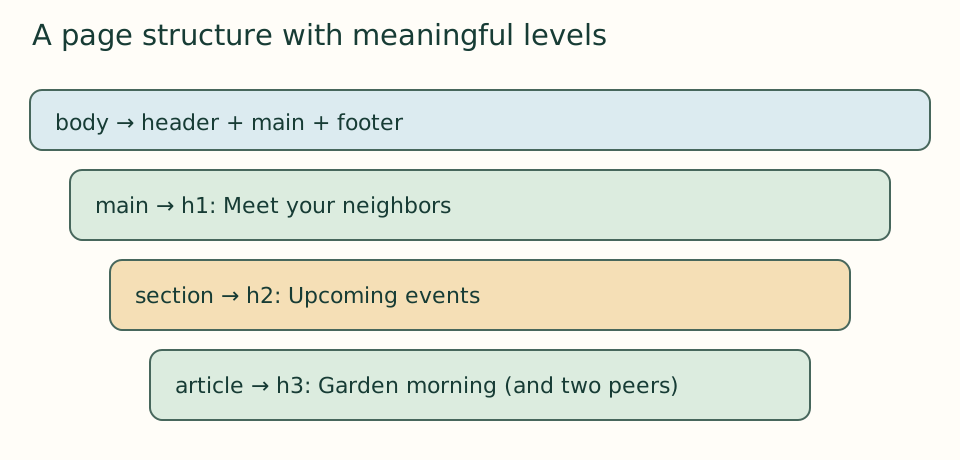
Keep one h1 for this page’s overall topic. Use h2 for its major sections and h3 for each event within the events section. Think of heading levels as a table of contents. A garden event is part of the events topic, so it belongs below that h2. Do not jump to h4 because its default appearance looks attractive. A good outline can be understood without reading every paragraph.
<header><p>Harbor Together</p></header>
<main>
  <h1>Meet your neighbors</h1>
  <section id="events">
    <h2>Upcoming community events</h2>
    <article id="garden-morning">
      <h3>Garden morning</h3>
      <p>Plant herbs and learn how to care for seedlings.</p>
      <p><time datetime="2026-11-07T10:00">7 November 2026, 10:00</time></p>
    </article>
  </section>
</main>
<footer><p>Fictional learning site.</p></footer>
Replace the two body elements from module 00 with this structure. There should still be only one body and one main. The header introduces the site; main identifies the page’s main content; footer contains closing information. These landmarks give the document useful destinations. An article is appropriate for an event description that could stand on its own. A generic div is still useful when a wrapper has no meaning beyond layout, but we do not need one around every sentence.
Use elements for their actual purpose
Now add the event’s place and access details as paragraphs. Use strong around “Place:” when it deserves emphasis within the sentence; do not turn every paragraph into a heading. The time element keeps a readable date while datetime provides an unambiguous machine-readable value. Our example omits a timezone because it is a fictional local event; a real event needs its location and timezone communicated to visitors. A date that looks valid in code can still be factually wrong, so content checking remains your responsibility.
Arrival instructions are a useful unordered list because the items are related but not a required sequence. Use ul around li items. Use ol for an ordered process, such as steps for a workshop. A line break is not a substitute for a list: the browser cannot infer the same relationship from separate lines of text. A table is for genuinely tabular data, such as time slots compared against rooms, not for positioning the page.
<section id="visit">
  <h2>Plan your visit</h2>
  <ul>
    <li>Use the west entrance.</li>
    <li>Follow the paved route to the garden.</li>
    <li>Take a break in the quiet seating area.</li>
  </ul>
</section>
Trace nesting instead of trusting the browser
An opening tag starts a container and the matching closing tag ends it. Close the inner element before closing its parent. For example, <p><strong>Tools provided</strong></p> is properly nested. Browsers often repair malformed HTML, which can make a broken source appear acceptable. That repair may move elements or change relationships. Indentation and checking matching tags make the source easier to reason about.
An id names one specific element in the document. Each id must be unique. A class, introduced in CSS later, can identify many elements that share a styling role. Copying the garden article is a fast way to start another card, but also copies its id: change it to repair-cafe or story-circle. Duplicate identifiers are an easy mistake to carry forward into navigation and scripting.
For literal special characters, use character references where needed: & produces an ampersand and < produces a less-than sign. The latter matters when explaining HTML inside a page, since an actual < may begin markup. Use meaningful text first; avoid decorating a heading with symbols that may be read aloud awkwardly.
Build the next version
Add repair café and story circle articles below garden morning, each with its own h3, date, description, place, and access paragraph. Then add the arrival section. Use the content in version 01 as fictional source material, but write the structure yourself. Read the page from top to bottom. Can you locate each event by its heading alone? A plain-looking result is expected: the browser’s default stylesheet is doing the presentation for now.
Checkpoint: write the outline as h1 → h2 → h3 in your log and explain why each element is at that level. If an element’s only justification is “it looks right,” reconsider its meaning.
Open the checkpoint source
The runnable-version link shows the result. To inspect or copy its source, use your editor’s Open Folder or Open File command and choose versions/01/index.html inside the extracted course folder. From module 04 onward, also open that version’s styles.css. Keep your own harbor-work folder separate. Compare a small section, then type or transfer it into the corresponding place in your own files; opening a reference does not update your project automatically.
Your next step
Attempt the three practice tasks, then use the separate explained solutions to compare reasoning. Open this module’s runnable version. Technical references are listed in the dated source register.