08 · Handle remote-shaped data locally
Waiting is part of the interface
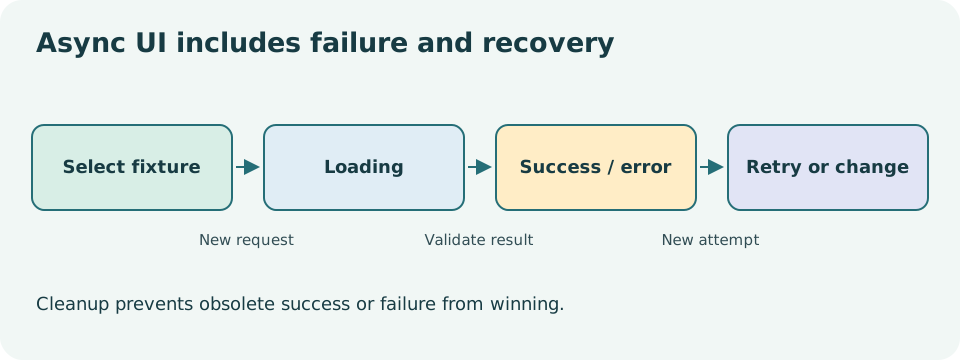
Until now, the event data were already available when rendering began. A fetch introduces time: the request starts, the UI waits, and the result may succeed, be empty, fail, or become obsolete. Users need an honest description of that state rather than a blank screen or a misleading old success message.
Checkpoint 08 requests local synthetic fixtures from the Vite server. No third-party API or real account is involved. The exercise still exposes the important boundaries: HTTP status, JSON syntax, domain shape and asynchronous ordering.
Make impossible combinations harder to represent
Three booleans such as loading, hasError and hasData allow contradictory combinations. A discriminated union describes the states the app actually supports:
type LoadState =
  | { status: 'loading' }
  | { status: 'error'; message: string }
  | { status: 'success'; events: CommunityEvent[] };
The status property is the discriminant. Checking it narrows the other properties. In an error branch, message exists. In a success branch, events exists. An empty events array is successful data with zero records; it is not the same as a failed request. If your design needs an initial idle state before any request, add that state deliberately. This checkpoint starts loading on mount, so loading is a meaningful initial state.
When rendering, handle each state explicitly. A loading status tells the learner work is in progress. An error explains what can be retried. A successful empty result says that no events were supplied. A successful nonempty result renders the cards. Filtering to zero matches is another valid empty UI with a different explanation.
Fetch has several failure boundaries
A fulfilled fetch promise can still contain an unsuccessful HTTP response. Check response.ok before reading the body as the expected data. Parsing JSON can then fail independently. Finally, parse the resulting unknown value with the domain validator from lesson 03.
async function loadEvents(url: string, signal: AbortSignal) {
  const response = await fetch(url, { signal });
  if (!response.ok) {
    throw new Error(`The fixture request failed (${response.status}).`);
  }
  const value: unknown = await response.json();
  return parseEvents(value);
}
This helper does not change React state. It either returns validated records or rejects. The component or custom hook translates that outcome into UI state. Keeping the boundary separate makes its error cases easier to test. The helper’s inferred return type follows parseEvents; you can add an explicit Promise return type when it clarifies an exported contract.
A missing file can behave differently on different dev servers: some return a 404 and others return an HTML fallback page. Both are failures for a JSON loader, but one fails at the status check and the other at JSON parsing. The course’s deterministic mocked HTTP test checks the unsuccessful HTTP-status branch separately from browser fixture behavior.
Prevent an old request from winning
Suppose the learner selects fixture A, then fixture B. B finishes first, but A finishes later. Without protection, A could overwrite B’s result and display data for a selection the UI no longer shows. Fast local data can hide this bug, which is why controlled async tests matter.
An effect can own one request for the current fixture selection. Create an AbortController for that effect run, pass its signal to fetch, and abort during cleanup. An active flag or equivalent check also prevents completed obsolete work from committing state. Guard both the success and error paths; an aborted old request should not replace a newer result with an error.
Do not make the effect callback itself async. An async function returns a promise, while React expects the callback to return cleanup or nothing. Define an async function inside the effect, call it, and return synchronous cleanup from the outer callback. Include the selected fixture and any retry token in the dependencies. The full implementation is in the checkpoint’s shared loading hook.
Retry is an intentional new attempt
A retry button should start another attempt using the current fixture. It should not reload the entire document or silently switch to valid data. A small attempt counter can be a dependency of the loading effect. Increment it in the click handler; the effect then synchronizes with a new request.
While loading, decide whether old records remain visible. This course favors a simple replacement model with clear loading feedback, rather than teaching cache freshness or optimistic updates. A production app might use a data library with caching and deduplication, but that is a separate design problem. First understand the lifecycle and failure model being managed.
Read a custom hook without treating it as magic
A custom hook is a function whose name starts with use and which can call other hooks. It packages a reusable stateful relationship, such as loading records for a fixture URL. Each call has its own state; the hook name does not create a global shared cache. Call hooks at the top level of a component or another hook, not conditionally inside a success branch.
Read the hook from inputs to initial state to effect setup to cleanup to returned value. Draw the timeline for rapid fixture changes. Ask which request is allowed to update state at each point. If you cannot answer, adding another boolean will probably make the problem harder rather than solve it.
Capture failure evidence
Try normal, empty, malformed and wrong-shape fixtures. Retry an error and confirm the same error can recur honestly. Then select valid data and recover. In a browser, throttle the local request if available and change fixtures quickly; separately run the deterministic tests that control request ordering. Record exactly which evidence is browser-observed and which comes from a simulated DOM.
Complete the exercises and second assessment, then read the solutions. Explain why a type assertion cannot repair a malformed response and why cancellation is not an error the learner needs to fix.
Primary reading: useEffect data fetching, synchronization and cleanup, Fetch, TypeScript narrowing.