
SQL · Module 1
Start with a question and a safe lab
Estimated study time: 60–90 minutes. Read, predict, run, explain, then attempt the independent work.
A store manager asks, “How did sales change this quarter?” SQL can retrieve the records needed for an answer, but the question is not yet precise enough to code. Does sales mean orders placed, money collected, or the value left after refunds? Does a cancelled order count? When did the quarter end? An analyst's first job is to turn those questions into a definition another person could repeat.
This course follows a fictional small retailer through January to March 2025. Every name and transaction is invented. We will use the same records throughout so that a new SQL idea solves a familiar problem. Our final report includes completed orders placed from 1 January up to, but not including, 1 April. It subtracts refunds recorded before 1 April and assigns them to the original order month. That is a defined course metric, not accounting advice or a universal revenue rule. The currency is INR; taxes, shipping and costs are outside the dataset.
What a database gives you
A table stores rows with named columns. A row in customers describes one customer; a row in orders describes one order. A column has a type: an integer for a count or identifier, text for a label, date for a calendar date, and numeric for an exact decimal amount. A database enforces some rules about those values and lets you ask reproducible questions across tables. A query is the instruction; its result is another table-like set of rows. Retrieving a result does not change the source table.
The most useful sentence to write about any table is “One row represents ...”. This is its grain. One order can contain several product lines, and one order can be paid in installments. Therefore orders, order_items and payments do not have the same grain. Counting lines answers a different question from counting orders. This difference will later explain why a perfectly valid join can produce a wrong sales total.
A primary key identifies a row uniquely. orders has order_id as its key. order_items uses the pair order_id and line_no because line 1 can occur on many orders. A foreign key links a child row to an existing parent, such as orders.customer_id to customers.customer_id. The key states a relationship, not a business conclusion: it does not say that every customer has ordered or that every order has been paid.
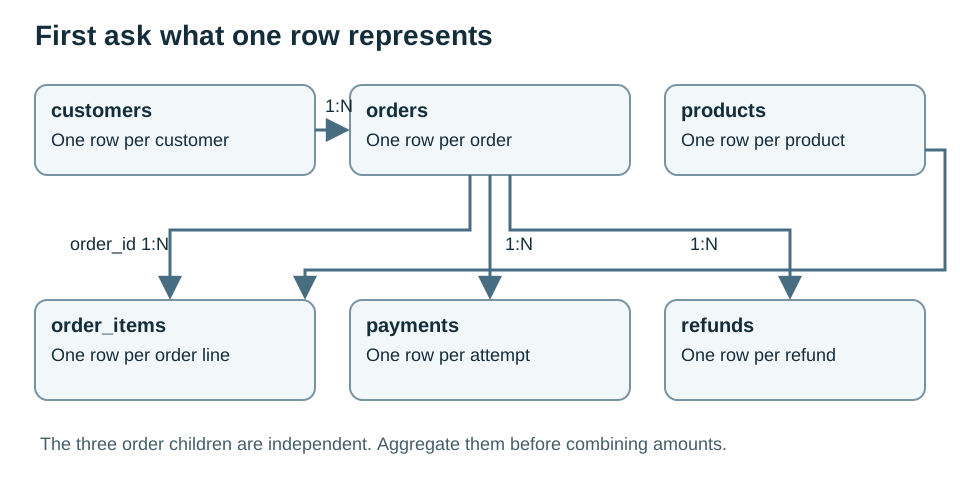
Read the diagram explanation
Customers connect one to many to orders. Orders connect one to many to order lines, payments and refunds. Products connect one to many to order lines.
Make a safe practice space
Follow SETUP.md now. The recommended path installs one pinned package and runs a private in-memory PostgreSQL-compatible lab through Node. It does not require a PostgreSQL server, a cloud account or payment. Each run starts from the same synthetic data. The alternative instructions are for people who already have a separate PostgreSQL practice database. Do not load the setup script into a work or production database.
The setup script creates a dedicated schema named aabha_sql. The dot in aabha_sql.orders means “orders inside this schema”; it is not a file path. The lab deliberately keeps setup separate from analysis: setup creates and fills tables, while the lesson queries read them. Later we will examine read-only transactions and why they are only one safety layer.
For your first inspection, COUNT() means “count the input rows.” In a query such as SELECT COUNT() FROM aabha_sql.orders, SELECT specifies the answer and FROM names the table. COUNT(DISTINCT order_id) counts different non-null identifiers. Compare those two counts to test a proposed one-row-per-order result. Equality alone does not establish that every expected order is present, so we will also test coverage and totals.
Worked example 01 profile
Run this supplied setup check without needing to write it yet. Each SELECT counts one table; UNION ALL stacks the small answers without removing any. We revisit aggregation in module 5. Expect 8 customers, 14 orders, 19 lines, 16 payments and 4 refunds. If the counts differ, fix setup before continuing.
SELECT 'customers' AS table_name, COUNT(*) AS row_count FROM aabha_sql.customers
UNION ALL SELECT 'orders', COUNT(*) FROM aabha_sql.orders
UNION ALL SELECT 'order_items', COUNT(*) FROM aabha_sql.order_items
UNION ALL SELECT 'payments', COUNT(*) FROM aabha_sql.payments
UNION ALL SELECT 'refunds', COUNT(*) FROM aabha_sql.refunds
ORDER BY table_name;
Expected result from the bundled dataset:
| table_name | row_count |
|---|---|
| customers | 8 |
| order_items | 19 |
| orders | 14 |
| payments | 16 |
| refunds | 4 |
The runnable file is sql/examples/01_profile.sql.
Independent practice
01a
Count rows and distinct order_id values in orders. Name the outputs rows and distinct_orders. Explain what matching counts support and what they do not prove.
Hint: Use the two COUNT forms introduced above; do not join another table.
01b
Count the rows in order_items as order_lines. Use the schema diagram to explain why this number differs from the number of orders.
Hint: A basket can contain more than one product line.
Check before moving on
You can open the guide, run a supplied query, state the grain of all six curated tables, and explain why an order count is not a line count. If your setup fails, use the troubleshooting section rather than continuing with guessed results.
Read the separate answers and explanations
Reading progress
13 lessons remain open to guests. Marking a lesson read records reading only; it does not award assessment credit or a certificate.
Device reading marks require browser storage. Reading is always available.
Sign in or create an account to save separate account progress. Your current page is kept.
Your earlier place on this device suggests these lessons. No new lesson is marked read.