
Python · Module 0
Run, change, explain
Outcome: run a short program, distinguish its source from its output, and keep your work. Profile: Python basics. Time: 30–45 minutes.
What a program does
A program is a sequence of instructions written precisely enough for a computer to carry out. Python reads your source code and evaluates it. The output is the result of that run; it is not a second version of the program. If the program prints 25, typing 25 into the editor does not recreate the calculation that produced it.
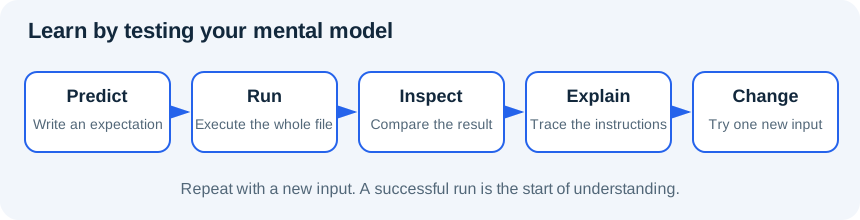
Learning to program starts with a useful loop: predict, run, compare, explain, change. Predicting makes you notice the parts you do not understand. When an output surprises you, the next step is to trace the instructions, not to try random punctuation until the error disappears.
Read the diagram explanation
Predict the output, run code, inspect the result, explain the difference, then change one thing.
Your first browser run
- Open Aabha Code Lab. This is a separate practice workspace.
- Choose Python basics in Practice profile. It loads the Python runtime without the data-science packages.
- Copy the entire worked example below into Editable practice.py, replacing the preset.
- Before running, write down the three lines you expect. Select Run Python and read Execution output.
- Change
minutes = 15tominutes = 20. Predict which output lines will change. Run the whole program again. - Select Download edited work and keep the downloaded copy somewhere you can find it. The lab stores edits in this browser origin, but that is not a backup.
Each run begins with a fresh Python execution context. A variable from an earlier run is not a reliable dependency. Put every required definition in the code you run now. The lab's Check example validates its own preset exercise; it does not grade this course or award completion. Stop ends a run. Reset workspace can replace edits, so save your work before using it. We do not rely on reset or reload to preserve generated files.
Worked example
# Profile: Python basics. Run this entire file in a fresh run.
print("Hello, data learner!")
minutes = 15
print("Practice minutes:", minutes)
print("After another session:", minutes + 10)
# A comment explains intent. Python does not execute the comment.
The quotes identify text. Parentheses enclose the arguments supplied to print. The equals sign assigns the value 15 to the name minutes; it is not an equality question. The final line calculates a value and prints it, but does not change minutes. The line beginning with # is a comment for people reading the code.
Expected output, apart from the lab's runtime messages:
Hello, data learner!
Practice minutes: 15
After another session: 25
First errors are information
Delete the closing quote after Hello, data learner! and run again. Python cannot parse the text, so it reports a SyntaxError. Restore the quote and rerun. Next, change just one use of minutes to minute. Python reports a NameError because those are different names. Undo it. These are controlled experiments; do not leave the broken version as your final work.
Do not paste private records, credentials or secret tokens into practice code. All course data is synthetic. The lab needs network access for initial package loading, and a slow first run does not necessarily mean your program is wrong.
Practice
Open exercises/00_first_run.py.
- 0A: print
Hello, Aabha learner!with that exact punctuation. - 0B: assign 20 to
minutes, then print the result of adding 15. - 0C: add a comment explaining why the result is 35. Download the program, reopen the saved text and check that your change is present.
Exit check
Explain which is source, which is output and which is a comment. Why should a fresh run include its own definitions? What will print(minutes + 15) do if there is no earlier assignment in the same program?
Move on once you can predict all three lines without running the example. See the separate SOLUTIONS.md only after trying.
Further reading
Read the separate answers and explanations
Reading progress
11 lessons remain open to guests. Marking a lesson read records reading only; it does not award assessment credit or a certificate.
Device reading marks require browser storage. Reading is always available.
Sign in or create an account to save separate account progress. Your current page is kept.
Your earlier place on this device suggests these lessons. No new lesson is marked read.