
Python · Module 2
Decisions and repetition
Outcome: trace a branch or loop and test its boundaries. Prerequisite: Module 1. Profile: Python basics. Time: about 2 hours.
Make a rule explicit
Programs often apply the same rule to different values. An if statement selects a block when its condition is true. Optional elif branches test alternatives in order, and else handles whatever remains. Only the first matching branch of that chain runs. This order matters: if minutes >= 0 comes before minutes >= 30, every non-negative value will match the first branch and the later branch cannot classify a long session.
A colon ends the condition line. The following block is indented consistently, normally with four spaces. Indentation is part of Python's syntax; it shows what belongs to the branch or loop. A line aligned back with if is outside that block. Mixing tabs and spaces makes code difficult to interpret and can produce errors.
For a session label we will use a fully specified rule: negative is invalid, zero is rest, 1–29 is short, and 30 or more is long. The boundary 30 belongs to long. Saying “around 30” is too vague for code. Useful tests include -1, 0, 1, 29, 30 and 31.
Repeat a step with a loop
A list is an ordered collection written with square brackets. We will study it in detail next. For now, for minutes in [15, 30, 0, 45]: takes each item in order and runs the indented body with minutes referring to that item.
An accumulator stores a result as the loop progresses. Initialize it before the loop; update it inside the loop. If you put total = 0 inside the loop, the program forgets earlier additions on every iteration. Empty input is also worth considering: an accumulator initialized to zero remains zero if there are no iterations.
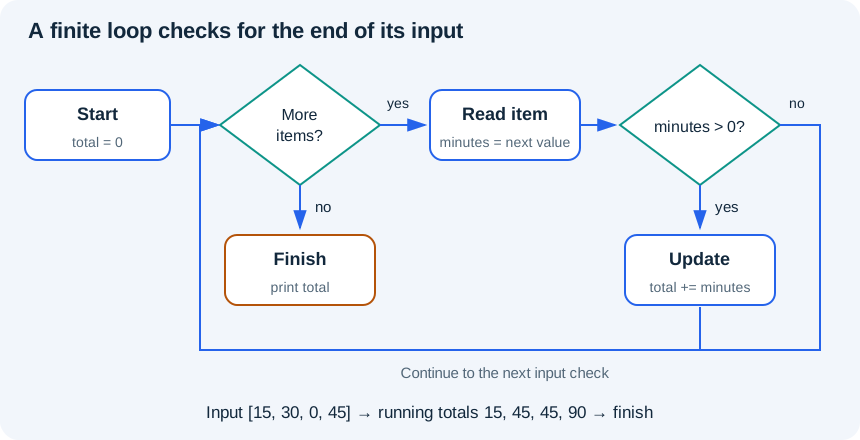
Read the diagram explanation
Start at zero, check whether another item exists, read it, add positive values and check for another item. When no items remain, finish and print the total.
Worked example
# Profile: Python basics
minutes_by_session = [15, 30, 0, 45]
total = 0
active_sessions = 0
for minutes in minutes_by_session:
    if minutes > 0:
        active_sessions = active_sessions + 1
        total = total + minutes
    else:
        print("Rest session")
print("Total minutes:", total)
print("Active sessions:", active_sessions)
for attempt in range(1, 4):
    print("Practice attempt", attempt)
# A while loop needs a condition that eventually becomes false.
remaining = 3
while remaining > 0:
    print("Countdown", remaining)
    remaining = remaining - 1
Trace total after each input: 15, 45, 45, 90. active_sessions changes to 1, 2, stays 2, then becomes 3. Zero follows the else branch and prints Rest session. The final totals are 90 minutes and 3 active sessions.
range(1, 4) produces 1, 2 and 3. Its stop value is excluded. range(3) produces 0, 1 and 2. It is often useful for a known number of repeats. Use a direct loop over values when you need the values themselves; do not add index arithmetic merely to make the program look more advanced.
To record values as a loop runs, start with an empty list such as countdown = [] and use countdown.append(remaining) inside the loop. append adds one item at the end; it changes that list. This small list operation is enough for the countdown exercise, and Module 3 explores collections further.
A while loop repeats while its condition remains true. The countdown moves from 3 to 2 to 1 to 0; at 0 the condition fails. Forgetting the decrement creates an unbounded loop. In the browser, Stop is the recovery control, but your final program should have a clear stopping condition.
Conditions can be combined
and requires both conditions to be true; or requires at least one; not reverses a boolean. For example, minutes >= 0 and minutes < 30 includes rest and short sessions. Write the rule in plain language first, then translate it. Do not use if value == 1 or 2; the 2 is evaluated separately as a truthy value. Use value == 1 or value == 2, or later, value in [1, 2].
A break exits a loop immediately and continue skips to its next iteration. Neither is needed for these exercises. Prefer the clearest finite loop you can explain before adding extra control paths.
Practice
- 2A: implement the four session labels in
exercises/02_control_flow.py. Test all six boundary inputs listed above. - 2B: sum only the strictly positive values in
[10, -5, 0, 25]. The answer is 35. Repeat with an empty list and with only negative numbers. - 2C: build
[3, 2, 1]with a while loop. Explain which variable makes the loop finish; then test a starting value of zero.
Add a matched boundary case
Keep the supplied 30→long case. In a separate scratch run, copy your branch and set minutes = 0, with the expectation assert label == "rest". Decide the expectation before execution. Use this boundary table: -1→invalid, 0→rest, 1→short, 29→short, 30→long, 31→long. Save the original case so a new experiment does not erase old evidence. After Module 4, you can put this branch in a function and loop over input/expected pairs.
You may see total += value or remaining -= 1 in an answer. These are short forms of total = total + value and remaining = remaining - 1 for these numeric variables. Use the expanded form until the shorthand feels natural.
Exit check
Trace each iteration of your solution using a small table on paper: current value, condition, accumulator. Why must the accumulator begin before the loop? What is the last value produced by range(2, 5)? Which boundary input would expose a mistaken > where you needed >=?
Further reading
Read the separate answers and explanations
Reading progress
11 lessons remain open to guests. Marking a lesson read records reading only; it does not award assessment credit or a certificate.
Device reading marks require browser storage. Reading is always available.
Sign in or create an account to save separate account progress. Your current page is kept.
Your earlier place on this device suggests these lessons. No new lesson is marked read.