
Python · Module 7
NumPy arrays
Outcome: explain shape and axes, apply elementwise operations and make an independent copy. Prerequisite: Modules 0–6 or readiness diagnostic. Profile: Data · NumPy and pandas. Time: about 2 hours.
Why another container?
Python lists are flexible general-purpose collections. NumPy arrays provide a regular numerical structure and operations that work across it. Instead of writing a loop to divide each duration by 60, an array can express minutes / 60 directly. This is called an elementwise operation: each element is transformed. It is clearer for many numerical tasks, but does not excuse misunderstanding the underlying operation.
A normal numeric array has a shared dtype, such as an integer or floating-point type. Mixing numbers and arbitrary text can lead to an unsuitable dtype and surprising behavior. Choose a numerical dtype deliberately when the task calls for numerical work. An array of zeros is data; an array containing NaN includes missing/invalid floating-point values, which ordinary reductions may propagate. Do not silently substitute zero for missing observations.
Shape answers “how is it arranged?”
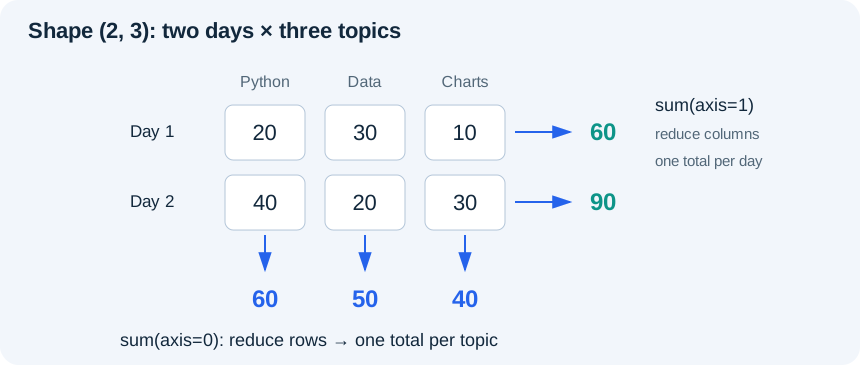
Our example has two days and three topics per day. Its shape is (2, 3), its number of dimensions is 2 and its number of elements is 6. Index [0, 1] selects day 0, topic 1. The first dimension is rows in this two-dimensional example; the second is columns.
Read the diagram explanation
A two by three array has row totals 60 and 90 when reducing axis one, and column totals 60, 50, 40 when reducing axis zero.
An axis argument says which dimension is reduced. sum(axis=0) combines the two rows and leaves three topic totals. sum(axis=1) combines the three columns within each row and leaves two day totals. Check the output shape before deciding that you used the right axis. A correct-looking number in the wrong orientation can lead to a misleading analysis.
Worked example
# Profile: Data · NumPy and pandas
import numpy as np

minutes = np.array([[20, 30, 10], [40, 20, 30]], dtype=float)
print("Shape:", minutes.shape)
print("Each day's total:", minutes.sum(axis=1).tolist())
print("Each topic's total:", minutes.sum(axis=0).tolist())
print("Hours:", (minutes / 60).round(2).tolist())
print("At least 30 minutes:", minutes[minutes >= 30].tolist())
# Basic slicing can share memory. Copy before making independent edits.
first_day_copy = minutes[0].copy()
first_day_copy[0] = 99
print("Original first value:", minutes[0, 0])
Expected day totals are [60.0, 90.0]; topic totals are [60.0, 50.0, 40.0]. The threshold mask selects [30.0, 40.0, 30.0]. The first original value remains 20.0 after editing the explicit copy.
The comparison minutes >= 30 produces a Boolean array with the same shape. Indexing with that mask selects matching values. This is filtering, not replacing values: the result contains only the selected entries. Combine NumPy masks using & and |, with parentheses around each comparison; Python's scalar and and or are not the same operation on an array.
Dividing an array by the scalar 60 applies the operation to every element. This simple broadcasting is enough for this course. When combining two non-scalar arrays, shapes must be compatible; accidental broadcasting can create a larger result than intended. Always inspect .shape. Matrix multiplication is a separate operation from elementwise multiplication and belongs in later study, not in this introductory data summary.
Copies and views
A basic NumPy slice can be a view sharing the original array's data. first_day = minutes[0] does not guarantee an independent row. Changing first_day[0] may change minutes[0, 0]. Use .copy() when independent edits are intended. Not all indexing operations return views; the useful habit is to reason about ownership instead of assuming every selection copies.
The function np.array_equal checks exact array contents; np.allclose compares approximate numeric arrays within a tolerance. For tests involving division, allclose is often appropriate. For exact integer selections and shapes, direct exact checks are more informative. Choosing a comparison does not solve a missing-value policy; state that separately.
Contrast and transfer
Python list multiplication repeats entries: [10, 20] * 2 becomes [10, 20, 10, 20]. NumPy numeric multiplication transforms entries: np.array([10, 20]) * 2 becomes an array containing 20 and 40. Compare lengths and values, not just how compact the expressions look.
For a new non-square practice array, use [[15, 30, 45], [20, 40, 60]]. Before running, predict the shape and values after summing over axis 0 and axis 1. Convert the array to hours and check the result with np.allclose(hours, [[0.25, 0.5, 0.75], [1/3, 2/3, 1.0]]). This checks approximate division results; array_equal remains suitable for the exact integer totals.
Optional dtype/missing-value experiment: inspect np.array([1, "2"]).dtype, then try to add the number 1 and read the error. Next compare np.mean([1.0, np.nan]) with np.nanmean([1.0, np.nan]). The second deliberately excludes a missing observation; it does not recover its value. State that exclusion before interpreting the result. These are awareness checks, not a comprehensive missing-array policy.
Practice
Complete exercises/07_numpy.py.
- 7A: for
[[10, 40], [20, 50]], compute row totals[50, 70]and column totals[30, 90]. Explain each axis in words. - 7B: select values at least 40 with a Boolean mask. Test a threshold that selects nothing and inspect the resulting shape.
- 7C: copy the first row, change its first value to 99 and prove the original still starts with 10. Then deliberately repeat without
.copy()in a scratch run to observe the difference.
Exit check
What is the shape of a two-row, three-column array after summing over axis 1? Why is values * 2 different for a Python list and a NumPy numeric array? Which kind of edit needs a copy, and why might changing a view be useful when it is deliberate?
Further reading
Read the separate answers and explanations
Reading progress
11 lessons remain open to guests. Marking a lesson read records reading only; it does not award assessment credit or a certificate.
Device reading marks require browser storage. Reading is always available.
Sign in or create an account to save separate account progress. Your current page is kept.
Your earlier place on this device suggests these lessons. No new lesson is marked read.