
JavaScript · Module 3
Choose a path and repeat a task
A program needs rules, not guesses
A capacity message should change when an event fills up. Start with an ordinary sentence: if no places remain, say “Full”; otherwise say how many places remain. An if statement evaluates a condition and selects a branch. The braces group the instructions in each branch. Only the chosen branch runs.
const remaining = 0;
let message;
if (remaining === 0) {
  message = "Full";
} else {
  message = `${remaining} places available`;
}
console.log(message);
With remaining 0, the equality comparison is true, so message becomes Full. With remaining 7, it is false and the other branch supplies the count. Notice that the code tests the rule before formatting the message. This makes the decision easier to examine than hiding it inside a complicated sentence expression.
Order the rules deliberately
Suppose counts can be invalid. A negative remaining count should not become a normal “-1 places available” label. Add a more specific guard first, then the ordinary cases:
if (remaining < 0) {
  message = "Check the event data";
} else if (remaining === 0) {
  message = "Full";
} else {
  message = `${remaining} places available`;
}
The program checks from top to bottom and stops at the first true branch. Test -1, 0 and 1. These boundary cases expose mistakes more efficiently than testing only 7. A rule such as remaining <= 0 would deliberately combine invalid negative data with a genuinely full event. Whether that is correct depends on the requirement; here we want to spot invalid data.
JavaScript conditions can also convert values to boolean truthiness. 0, "", null, undefined and NaN are falsy; nonempty strings are truthy, including "false" and "0". Use explicit comparisons when a business rule is about a count or a particular string. if (remaining) is too vague when zero is a meaningful state.
Repeat with a bounded loop
An array is an ordered collection written with square brackets. We will study arrays properly in lesson 05; for now imagine three event seat counts laid out in order. A for...of loop takes one value at a time. This lets the same instruction apply to every value without duplicating it:
const counts = [7, 0, 2];
let total = 0;
for (const count of counts) {
  total = total + count;
}
console.log(total); // 9
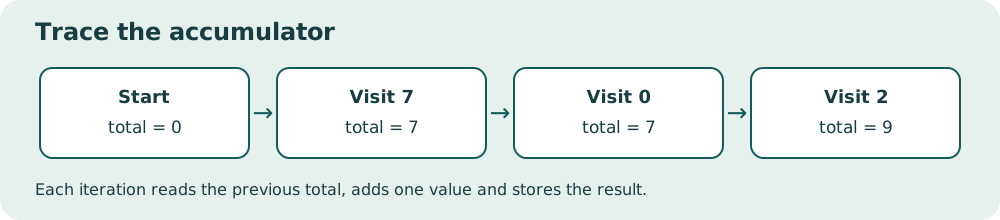
Trace it on paper. Before the loop total is 0. The first count is 7, so total becomes 7. The second count is 0, so total stays 7. The third count is 2, so total becomes 9. The loop then ends because there is no next value. The const count binding is new for each iteration; total must use let because its value is reassigned.
Read the diagram explanation
Each iteration reads the previous total, adds one value and stores the result.
A classic counted for loop is useful when the index itself matters:
for (let position = 1; position <= 3; position = position + 1) {
  console.log(`Stop ${position}`);
}
Read the three sections as initialization, continuation test and update. Position starts at 1. Before each body run, it must be at most 3. After each body run it increases by 1. When it reaches 4, the test fails. A missing update can cause a loop that never finishes and makes a tab unresponsive. Use bounded collections whenever possible. If you freeze your practice tab, close it, fix the source file and reopen it.
Avoid a subtle location mistake
Put the running total declaration before the loop. If let total = 0 is inside, every iteration starts over and you lose previous work. Conversely, a per-event label belongs inside the loop because it should be recalculated for every event. The question is “What must survive between iterations?” not simply “Where does this line fit?”
Run version 03 — download the course ZIP (Extract it and follow the included setup instructions for examples/03/index.html.). Predict its sequence of labels and its total before checking. Add a fourth count and see whether the loop handles it without editing the body. That is one benefit of repetition: the logic follows the data's length.
When you are ready
Explain one branch in plain language, identify a boundary value, and trace one loop by recording the values after each iteration. Do this before shortening the code. Clever-looking code that you cannot trace is harder to repair than a longer clear version. Next we will name a useful chunk of logic so that other parts of the program can call it.
Reference: control flow. The traces and event rules here are original worked examples.
Practice and next step
Open exercise 03. Attempt the prediction before running code. Record the observed result and explain any mismatch. The explained solution is separate so you can choose when to look.
Read the separate answers and explanations
Reading progress
10 lessons remain open to guests. Marking a lesson read records reading only; it does not award assessment credit or a certificate.
Device reading marks require browser storage. Reading is always available.
Sign in or create an account to save separate account progress. Your current page is kept.
Your earlier place on this device suggests these lessons. No new lesson is marked read.