
JavaScript · Module 9
Wait for data with promises and fetch
Waiting is a state the interface must explain
Our early events were written directly inside a script. Now we will load a JSON file. JSON is a text format for data: property names use double quotes; comments and functions are not allowed. Loading a file takes time, even on a local server. The program must represent loading, success, empty data and failure instead of pretending that data appears instantly.
A promise represents the eventual result of an operation. It starts pending and settles as fulfilled with a value or rejected with a reason. Calling fetch returns a promise rather than the event array. The browser can continue other work while the request is pending. An async function lets us write await to suspend that function's continuation until a promise settles. It does not freeze the whole browser.
Read the two waiting points
Here is a small loader. The complete version 09 — download the course ZIP (Extract it and follow the included setup instructions for examples/09/index.html.) adds a button, status messages and data-shape checking.
async function loadEvents() {
  const response = await fetch("./events.json");
  if (!response.ok) {
    throw new Error(`HTTP ${response.status}`);
  }
  const data = await response.json();
  return data;
}
The first await waits for a Response. A response is not yet our JavaScript array; it represents an HTTP response with status and a body. The second await reads and parses the body as JSON. Either step can fail. A successful parse is also not proof that the data has the shape our renderer expects. An object like {"message":"hello"} is valid JSON but is not an array of event records.
Fetch rejects for some request failures, including network problems. HTTP error responses such as 404 generally fulfill with a Response, so check response.ok explicitly. It is true for status codes from 200 through 299. Do not put every failure under “no internet”: a wrong path, an HTTP error, malformed JSON and invalid record structure are different causes.
Handle the result where the interface lives
The loader can throw an error to its caller. The interface decides what a visitor should see:
async function refreshEvents() {
  loadButton.disabled = true;
  status.textContent = "Loading practice events…";
  try {
    const events = await loadEvents();
    renderEvents(events);
    status.textContent = `${events.length} events loaded.`;
  } catch (error) {
    status.textContent = "Events could not load. Check the local server and retry.";
    console.error("Event loading failed:", error);
  } finally {
    loadButton.disabled = false;
  }
}
Try begins the operation that might fail. Catch receives a thrown error or awaited rejection. Finally runs after either outcome, so the button becomes usable again. The visible message offers a next step; the developer Console preserves technical evidence. Never display raw secret tokens or full private response bodies in error messages. Our fixtures contain only invented public-looking event details.
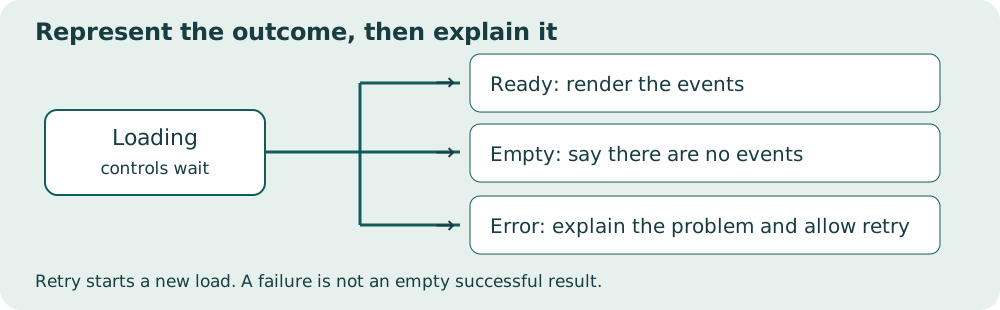
Read the diagram explanation
Loading branches to ready, empty or error. Error can retry and return to loading.
Connect await with then
The same promise can be handled using .then(successCallback).catch(failureCallback). An async function always returns a promise, even when it returns an ordinary value. await makes the call site easier to follow for this course. Do not mix both styles inside one small operation without a reason. Most importantly, do not forget to return or await a promise you want the surrounding code to wait for.
Predict this order before running it: log “start”; call an async loader that awaits fetch; log “request started”; after the awaited work, log “loaded”. The last message is delayed. The exact delay is not guaranteed. A fixed timeout is not a reliable way to wait for data; the promise itself tells you when the operation has settled.
Practice failure on purpose
Version 09 lets you choose normal events, an empty array, valid JSON with the wrong shape, malformed JSON and a missing file. The missing-file case intentionally produces a 404 in the Network panel. Re-enable the normal fixture afterward and retry. Recovery is part of the feature, not an extra decoration. A stale success message after a failure would mislead the visitor.
The capstone disables its load button during an active request so repeated clicks do not start overlapping loads. More advanced applications may cancel requests or discard outdated responses. Those techniques are outside this beginner build. We keep requests local to the same origin; do not try to “fix” CORS by adding no-cors or disabling browser security. Cross-origin APIs require a service that permits the requested use.
References: fetch, promises, JSON parsing.
Practice and next step
Open exercise 09. Attempt the prediction before running code. Record the observed result and explain any mismatch. The explained solution is separate so you can choose when to look.
Read the separate answers and explanations
Reading progress
10 lessons remain open to guests. Marking a lesson read records reading only; it does not award assessment credit or a certificate.
Device reading marks require browser storage. Reading is always available.
Sign in or create an account to save separate account progress. Your current page is kept.
Your earlier place on this device suggests these lessons. No new lesson is marked read.