
Stage 2 · L10
Connect the persistence story to PostgreSQL and Compose
Core · original Session 2; extended normalization/cardinality visuals
Use the starter for this stage's focused examples. The cumulative transfer and solution belong at the stage-end capstone. Baseline checks pass; transfer checks initially fail. Downloads contain the matching native starter and solution for this stage.
Stage 02 replaces the synthetic catalogue with PostgreSQL rows. The application connects through SQLAlchemy's psycopg dialect. A URL begins postgresql+psycopg:// and supplies connection coordinates; the server process and the database are separate resources. equipment.database reads only LAB_DATABASE_URL and does not search .env files or provide a hidden production fallback.
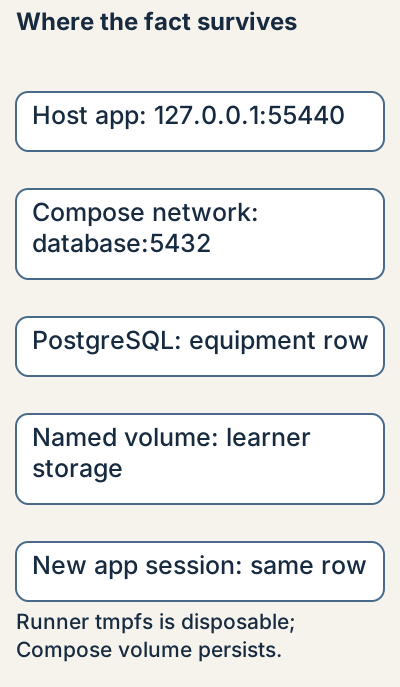
The development Compose example binds PostgreSQL only to 127.0.0.1:55440 and uses a learner-owned named volume. A host-run application uses 127.0.0.1:55440. A container on the same Compose network uses the service name database and internal port 5432. Inside an app container, localhost means that container, not the database container. DNS/service names and host-published ports describe different paths.
Start the database, wait for its health check, then run python -m alembic upgrade head. Readiness of PostgreSQL does not mean your equipment table exists. Start the app only after migration, seed one row, and GET /equipment/1. Restarting the app now leaves the row in the separate database. The /health/live route proves application liveness; /health/ready executes SELECT 1 but does not certify every table or business query.
Use only the supplied synthetic local password for this private exercise. An environment variable prevents a secret from being hard-coded in Python but does not automatically make it secret from your shell history or process/container inspection. Do not reuse a real credential, print production URLs, or check .env into Git. The check runner creates its own random fixture credential and never prints it.
The isolated fixture owns an internal network and disposable tmpfs. The persistent Compose path was separately run through02→09 using one project name: a down/up restart retained the seeded rows, and later identity/audit migrations preserved existing rental IDs, owners and states. Keep one unique COMPOSE_PROJECT_NAME across copied checkpoint folders. Use docker compose down to stop your database; add --volumes only when intentionally discarding your learner data.
Follow the running code
Focused lesson example; see the end-of-stage capstone for the cumulative app · stage 02
docker compose up -d --wait database
docker compose exec -T database pg_isready -U aabha_local -d aabha_local_learning
# Host-run application address: 127.0.0.1:55440
# Same-network container address: database:5432
Predict and observe this focused example using the concepts explained above. Its boundary is stated in the focused answer.
Guided lab
- Read the explanation and predict the focused example’s outcome.
- Choose the correct database host/port for a host-run app and a container on the Compose network. Stop/start the owned database while retaining its volume.
- Compare the observed outcome with the focused answer and state its boundary.
Expected: The host app uses 127.0.0.1:55440; the networked container uses database:5432. Container localhost names itself. pg_isready proves the PostgreSQL process accepts connections, not that equipment exists. docker compose down retains the named volume; intentionally adding --volumes discards it. No session, flush or transaction implementation is required in this exercise.
- Wrong container hostname → connection error; database ready but schema absent → missing-table error; liveness alone is insufficient.
Focused exercise and answer
Complete this focused exercise before reading its answer. The full native transfer is introduced only at the end of the stage.
Your transfer task: Choose the correct database host/port for a host-run app and a container on the Compose network. Stop/start the owned database while retaining its volume.
- Choose the correct database host/port for a host-run app and a container on the Compose network. Stop/start the owned database while retaining its volume.
Inspect the matching answer
This answer addresses the focused exercise above; the cumulative implementation is shown only after the stage prerequisites.
The host app uses 127.0.0.1:55440; the networked container uses database:5432. Container localhost names itself. pg_isready proves the PostgreSQL process accepts connections, not that equipment exists. docker compose down retains the named volume; intentionally adding --volumes discards it. No session, flush or transaction implementation is required in this exercise.Check your reasoning
Which hostname does a container use to reach another Compose service?
Show the explanation
Its service name on their shared network, not its own localhost.
Reading progress
54 lessons remain open to guests. Marking a lesson read records reading only; it does not award assessment credit or a certificate.
Device reading marks require browser storage. Reading is always available.
Sign in or create an account to save separate account progress. Your current page is kept.
Your earlier place on this device suggests these lessons. No new lesson is marked read.