
React/TypeScript · Module 3
Model trustworthy event data
A typed program can still receive bad data
The JavaScript course validated JSON before showing event cards. TypeScript does not make that check obsolete. A type checker studies your source before the app runs; a JSON file is data that arrives at runtime. The two checks answer different questions.
In this lesson you will describe an event's shape, narrow uncertain values, and inspect a parser that refuses invalid records. Checkpoint 03 uses local fixtures so you can deliberately send the parser the wrong shape without touching a real service.
Model the vocabulary of the application
An event needs an ID that survives sorting, a title, a category, a date, a location and a nonnegative number of available places. The category is a limited vocabulary rather than any arbitrary string:
type Category = 'outdoors' | 'learning' | 'creative';

type CommunityEvent = {
  id: string;
  title: string;
  category: Category;
  date: string;
  location: string;
  places: number;
};
The vertical bar forms a union: a category can be one of three string literals. If you misspell outdoors in a typed fixture, the checker can catch it. A number type alone cannot express “integer at least zero.” Likewise, a string type does not prove a calendar date is valid. Types describe useful structure; runtime rules enforce details that the type cannot establish.
Use a domain name such as CommunityEvent rather than Event, which is also a browser type. Use type-only imports when a file needs only a type. They communicate that no runtime value is being imported. An array annotation such as CommunityEvent[] means an array whose members meet the event shape, not a promise that a downloaded value was inspected.
An optional property, such as description?: string, may be absent. A caller must handle that possibility. The expression description ?? 'No extra details supplied.' uses a fallback for null or undefined, while preserving an intentionally empty string. Choose the rule you actually want; do not add optional marks merely to make errors disappear.
Admit uncertainty with unknown
Suppose a fixture contains { "events": [] } but the app expects an array directly. JSON parsing can succeed even though the application's expected shape is wrong. Assign the result to unknown and earn a more precise type by testing it:
function readTitle(value: unknown): string {
  if (typeof value !== 'object' || value === null) {
    throw new Error('Expected an event object.');
  }
  if (!('title' in value) || typeof value.title !== 'string') {
    throw new Error('Expected a text title.');
  }
  const title = value.title.trim();
  if (title.length === 0) {
    throw new Error('Expected a nonempty title.');
  }
  return title;
}
This small function is deliberately not a complete event parser. It demonstrates narrowing in an order you can explain. First reject non-objects and null. Then prove that the property exists and is text. Only then call trim. Each guard removes possibilities, so the remaining code can use a more specific type.
any skips useful checking and can carry a mistake deeper into the application. A type assertion such as value as CommunityEvent[] tells the checker what to assume; it does not inspect a single byte. Assertions are sometimes necessary at well-understood boundaries, but they are not a replacement for parsing unknown input in this course.
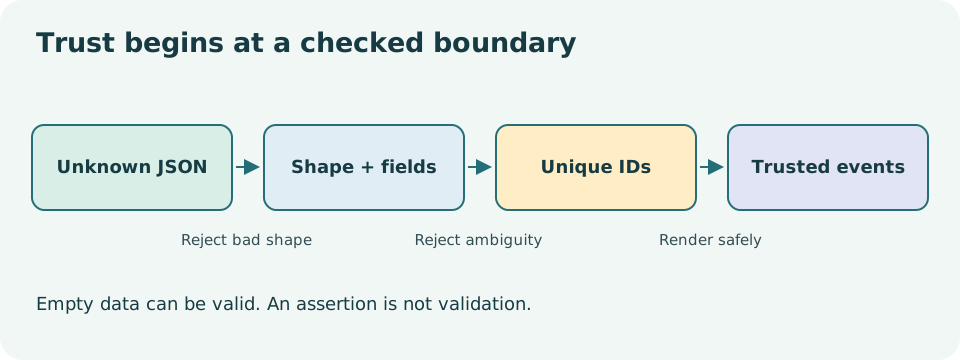
Read the diagram explanation
Unknown JSON must pass outer-shape, field and identity checks before the UI uses it.
Read the helper types without memorizing them
The complete source derives Category from a small constant array. as const asks TypeScript to retain the narrow literal values and readonly tuple shape, rather than widening every item to string. (typeof categories)[number] means “take the type of this array, then the type of any numeric-indexed member.” The result is the same three-literal union shown above. It is a way to keep the runtime vocabulary and type vocabulary aligned, not a runtime validator by itself.
Record<string, unknown> describes an object with string-keyed values that are still unknown. It does not mean every possible key exists at runtime. A predicate return annotation such as value is Category tells the checker that a true return narrows value to Category. The function body must actually verify that claim; TypeScript does not prove that a programmer-written predicate is truthful. The supplied isCategory checks all three allowed strings. These helpers keep the main parser readable. For your first implementation, explicit unions and direct guards are equally acceptable.
Read the whole parser as a contract
Inspect the supplied parser in the shared source. It checks the outer array, every record, required text, allowed categories, place counts and ID uniqueness. A repeated ID is important even when every individual record has the correct fields: React keys and saved-event references rely on identity being unambiguous. A parser should reject ambiguous data rather than quietly merge unrelated events.
Decide whether a parser rejects unexpected fields or ignores them. Either can be a deliberate contract; this teaching app constructs the fields it needs and does not treat extra input as permission to render HTML or submit data. Inspect its exact date checks too. A shape check for YYYY-MM-DD alone does not prove a date such as February 31 exists. Avoid describing the implementation as a full calendar validator unless it actually performs that validation.
The valid fixture retains the fictional events from the previous course. The malformed fixture is not JSON at all; the wrong-shape fixture is parseable JSON that violates the domain. These are different failures. Keep them separate in your evidence log so a future error message can tell the learner what went wrong.
Inference is useful inside trusted code
Once parsing succeeds, the rest of the app can work with CommunityEvent values. A filter callback receives an event; a map callback can read its title without repeated defensive checks. Validation is concentrated where untrusted values enter, not scattered into every JSX expression. That makes both the boundary and the UI easier to understand.
Checkpoint 03 imports its JSON fixture at build time. To test its runtime parser, copy the project, open checkpoints/03/main.tsx, and temporarily replace the imported value passed to parseEvents with [] or { events: [] }, keeping the file syntactically valid. Restore it afterward. A malformed imported JSON file fails in Vite before the component renders; the fetch-based malformed-JSON exercise belongs to lesson 08. Run these valid, empty and wrong-shape value experiments. An empty array should normally be a valid result with zero events, not a parsing failure. Markup-like text should remain visible text. Make one change to a copied fixture at a time: a negative capacity, an unknown category, then a duplicate ID. Predict which check catches it before running the page.
Prove the boundary
Complete the three exercises, including a small parser extension with its own failure cases. You should be able to explain why a successful type-check cannot guarantee a future fetch response, and why a valid empty result deserves different UI from an error. Compare with the separate solutions, then take the first mid-course assessment after lesson 05.
Primary reading: everyday types, narrowing, React with TypeScript, Fetch processing.
Read the separate answers and explanations
Reading progress
10 lessons remain open to guests. Marking a lesson read records reading only; it does not award assessment credit or a certificate.
Device reading marks require browser storage. Reading is always available.
Sign in or create an account to save separate account progress. Your current page is kept.
Your earlier place on this device suggests these lessons. No new lesson is marked read.