
React/TypeScript · Module 10
Test behavior and prepare a build
A passing check answers a particular question
The integrated explorer can look convincing while hiding a stale request, a duplicate ID or an inaccessible form. Testing is the practice of gathering evidence for a claim. Different checks cover different claims, so a green terminal is useful but never a blanket certificate.
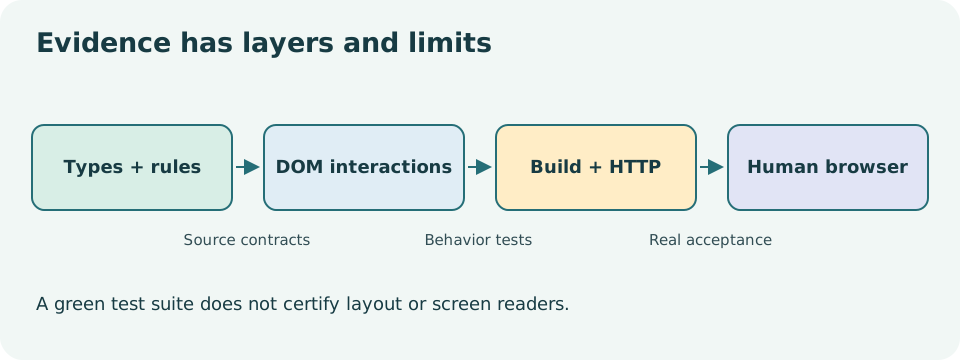
Type-checking asks whether the source follows its declared contracts. Pure-function tests ask whether rules produce expected outputs. Component tests ask whether rendered DOM and user interactions behave correctly in a test environment. A production build asks whether the toolchain can transform and bundle the application. Real-browser and human checks ask questions that those tools cannot fully answer.
Start with a small rule
The saved-ID toggle from lesson 05 is deterministic. Test adding, removing, preserving unrelated IDs and not mutating the input. Name tests by the behavior that matters, such as “removes an already saved event without changing other IDs.” A failure then tells you which rule was violated.
A parser test should include successful empty data, unknown categories, negative and fractional capacities, missing fields and duplicate IDs. A test that only repeats one happy fixture gives weak evidence for a boundary whose job is to reject invalid inputs. Write the expected result independently from the implementation; calling the same helper to calculate the expected answer can make the test agree with its own bug.
Test the interface as a person uses it
Vitest runs the test files. React Testing Library renders components and queries their DOM. user-event performs sequences that resemble interactions more closely than assigning a value property alone. The tests use a simulated DOM environment; that is fast and useful, but it does not lay out a real browser page.
const user = userEvent.setup();
render(<SearchableExplorer />);
await user.type(screen.getByRole('textbox', { name: /find an event/i }), 'garden');
expect(screen.getByRole('heading', { name: 'Garden morning' })).toBeInTheDocument();
This is a teaching sketch; use the actual component names and accessible labels in the supplied tests. A role-and-name query checks something meaningful about the interface. A selector tied to a CSS class can keep passing after a label becomes unusable. Test IDs are occasionally useful, but they should not be the first choice for controls that already have semantic roles and names.
Use getBy for something expected to exist now, queryBy when asserting absence, and findBy for something expected to appear asynchronously. Await user interactions and async queries. An arbitrary sleep of one second makes a test slow and flaky; it does not explain which observable condition you are waiting for.
Control external boundaries
Tests should not depend on a real remote API or a person's stored preferences. Provide deterministic fixtures, mock fetch at the request boundary where appropriate, and restore mocks and storage between tests. A failed-response test should specify its status. A stale-request test should deliberately resolve an older request after a newer request and prove that obsolete data do not replace the current result.
An abort test checks lifecycle behavior, not just the final heading. Form tests check the synthetic-only rule, error associations, success wording and reset behavior. Route tests can use a memory router to select a path without changing a real browser address. That verifies matching and component behavior; a browser still needs to verify actual URL history and refresh behavior.
Do not weaken an assertion just to turn red into green. First ask whether the implementation or the expectation is wrong. Keep a short defect record: failing behavior, smallest reproduction, correction and new evidence. The course's QA report follows the same principle.
Read the diagram explanation
Types, rules, simulated DOM, build and manual browser acceptance establish different claims.
Run the included checks
From the course root, run npm run typecheck, npm test, and npm run build. Read the script definitions so you know what each command includes. The learner capstone has a separate check command; its incomplete tasks are expected to fail until you implement them. Passing the reference suite does not grade your starter.
When a test fails, read the assertion and the rendered DOM before editing. If the app's actual accessible label is wrong, correct the app. If a deliberate product wording change is sound, update the test to the new contract and explain the change. Do not replace a role query with a broad text selector simply to avoid an ambiguous control.
Understand the production output
Vite's dev server transforms files on demand and helps you iterate. A production build produces static assets intended for a host. Source TypeScript becomes JavaScript; CSS and assets receive build paths. The course's build is a demonstration output, not a deployed website. The README identifies which entry pages are included and where to open them under preview.
Run the local preview command after a successful build. Preview is a way to inspect build output, not a production hosting service. Test the actual output paths, direct detail URLs, fixture requests and refresh. If the site will live under a subdirectory, base paths need a separate integration check. A build that works at the domain root can still have broken asset URLs under another path.
Never put secrets in client source or client-exposed environment variables. Anything shipped to the browser can be inspected. This demo requires no API keys, authentication or payment details. A future real registration system would require server-side validation, authorization, privacy and operational design beyond the scope of a static UI course.
Release only what the evidence supports
Complete the exercises and release assessment. Then begin the independent capstone. Your handoff should state what was checked, how it was checked, what remains unverified and how another person can reproduce the result. “All tests passed” without scope or commands is incomplete evidence.
Primary reading: Testing Library, queries, user-event, Vitest environments, Vite builds, static deployment.
Read the separate answers and explanations
Reading progress
10 lessons remain open to guests. Marking a lesson read records reading only; it does not award assessment credit or a certificate.
Device reading marks require browser storage. Reading is always available.
Sign in or create an account to save separate account progress. Your current page is kept.
Your earlier place on this device suggests these lessons. No new lesson is marked read.