
React/TypeScript · Module 4
Connect interactions to state
From a displayed value to a remembered choice
A search field is useful only when its current text changes the result list. In the earlier JavaScript app you read the DOM input and updated several other nodes. In React, keep the user's query in state and calculate the visible events from that query. The render describes both the control's value and the resulting UI.
State is information React remembers between renders. A plain local variable is recalculated each time the component runs. Changing that variable also does not tell React to render. A state setter requests an update; the next render receives the new value. This distinction is the foundation for every interaction in the course.
One source of truth
Start with the smallest complete model. The query is state because the user changes it independently. The result list and result count are derived because they can be calculated from the events and query:
const [query, setQuery] = useState('');
const normalized = query.trim().toLowerCase();
const visibleEvents = events.filter((event) =>
  event.title.toLowerCase().includes(normalized)
);

return (
  <>
    <label htmlFor="event-search">Find an event</label>
    <input
      id="event-search"
      value={query}
      onChange={(event) => setQuery(event.currentTarget.value)}
    />
    <p>{visibleEvents.length} matching events</p>
  </>
);
This excerpt belongs inside a component with useState imported and events supplied by trusted data. Open checkpoint 04 for the complete runnable context. The setter receives the input's text. React infers the event type from the input's onChange position, so we do not need an annotation for this inline handler. currentTarget is the element whose handler is running, which is the input we attached it to.
Do not store visibleEvents and count in separate state variables. That would create three values that must be kept in agreement. A forgotten update could show two cards and “six matching events.” Calculating them during render keeps the relationship explicit. Six fixture events are inexpensive to filter. Do not introduce memoization before you have a measured problem.
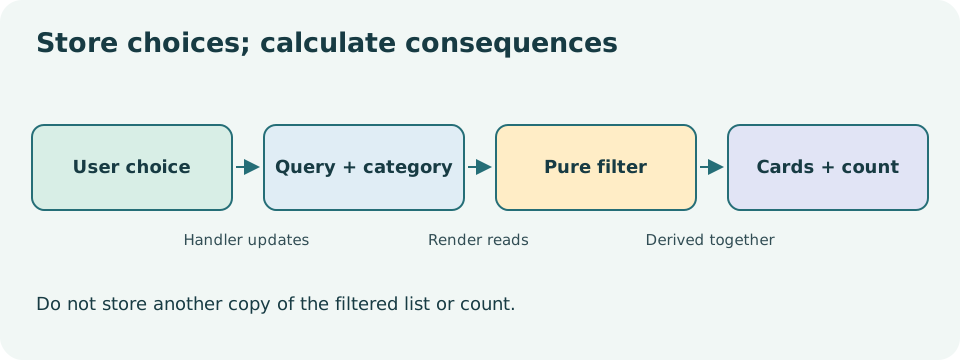
Read the diagram explanation
Query and category state combine with current records to derive visible cards and their count.
A handler receives a snapshot
Imagine count is zero in the current render. Calling setCount(count + 1) does not immediately rewrite the count variable inside the running handler. It schedules a new value. Three identical calls in that handler all calculate from the same zero, so they request the same next value.
When an update depends on the previous value, use the updater form:
setCount((previous) => previous + 1);
setCount((previous) => previous + 1);
setCount((previous) => previous + 1);
React processes these queued transformations. Each receives the pending result from the preceding one, so the final value rises by three. Updaters must be pure: return the next value without storage writes, alerts or unrelated state changes. Development checks can invoke them again to detect mistakes.
Pass a handler rather than calling it during rendering. onClick={handleReset} supplies a function for a future click. onClick={handleReset()} runs it now and supplies its return value. The latter can cause a render-update loop if the function sets state.
Update objects and arrays without mutation
React state should be treated as read-only. To change one property, create a new object with the old properties plus the changed property. To add an ID, create a new array. To remove one, filter into a new array. Changing an existing object's property can hide the change from code that relies on references and can also corrupt an earlier render's snapshot.
An array's sort method mutates its receiver. Use a copy before sorting when the original belongs to props or state. An object spread is shallow: it copies the outer object, not every nested object. This course keeps state deliberately flat, with IDs and strings instead of deeply nested editable records, so updates remain easy to reason about.
Lift state only as far as needed
Suppose SearchControls owns query but EventList also needs it. A sibling cannot directly read another sibling's local state. Put query in their closest common parent. Pass query down as a value and a callback down for changes. The child reports an interaction; the parent owns the update.
A callback prop might have the type (nextQuery: string) => void. The arrow describes a function accepting text and returning no useful result. It is not permission for the child to mutate the parent's data. This pattern creates a clear direction: values move down, interaction requests move back through callbacks.
Avoid lifting every temporary choice to the root. A disclosure used only inside one card can stay local to that card. State placement follows who needs the value and how long it should survive. Lesson 05 examines that lifetime in more detail.
Inspect the checkpoint, then perturb it
Open checkpoint 04 and type a matching fragment, a padded fragment and a nonmatching fragment. Confirm that normalization applies to searching while the field still displays the exact text you entered. Clearing the field should restore the initial results. A zero-result message should explain the situation without presenting it as a loading failure.
Use a keyboard throughout one complete pass. A rerender should not steal focus from the search input. Add a Console log inside a handler and then inside the component. Their frequencies differ because events cause renders, and development checks can also render. Remove temporary logs after learning what they show.
Complete the exercises. Before consulting the solutions, draw your own ownership diagram and name every stored and derived value. If you cannot explain why a value needs state, first try calculating it.
Primary reading: state snapshots, queued updates, state structure, when effects are unnecessary.
Read the separate answers and explanations
Reading progress
10 lessons remain open to guests. Marking a lesson read records reading only; it does not award assessment credit or a certificate.
Device reading marks require browser storage. Reading is always available.
Sign in or create an account to save separate account progress. Your current page is kept.
Your earlier place on this device suggests these lessons. No new lesson is marked read.