
React/TypeScript · Module 7
Synchronize with browser systems
Ask what is outside React
A saved-event count can be calculated from savedIds during render. A click that clears a selection belongs in a click handler. Neither requires an effect. Browser storage, however, exists outside React. Keeping a stored preference synchronized with the current selection is a genuine external-system problem.
An effect runs synchronization work after a commit. It is not a general-purpose place to put code that you do not know where else to put. Before adding one, name the external system and the condition that should keep it in agreement with React state.
Three possible homes for logic
Use this decision process. If you can calculate a value from current props and state, calculate it during render. If an operation happens because of a specific user action, put it in that action's handler. If the rendered component must maintain a relationship with an external system, consider an effect with complete dependencies and, where needed, cleanup.
For example, filtering six events is a calculation. A local form check is a submit event. Writing the current saved-ID preference to localStorage is synchronization. Subscribing to a browser event also creates an external relationship, and that subscription must be removed when no longer needed.
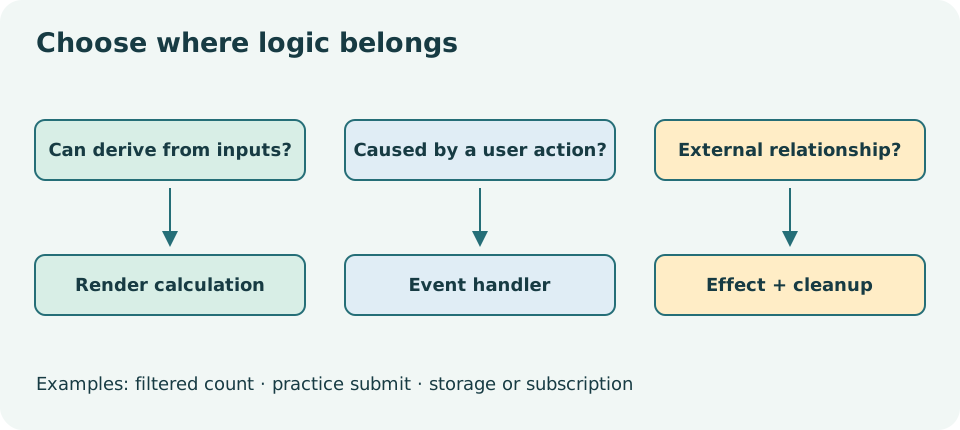
Read the diagram explanation
Three separate categories: derive values in render, respond to user actions in handlers, synchronize external systems in effects with cleanup when needed.
Dependencies describe the relationship
A minimal storage write demonstrates the shape:
useEffect(() => {
  try {
    localStorage.setItem(storageKey, JSON.stringify(savedIds));
  } catch {
    // The real checkpoint exposes a visible tab-only warning.
  }
}, [savedIds]);
This excerpt assumes storageKey is a fixed module-level constant. savedIds comes from the component, so it is a reactive dependency. The effect runs after the initial commit and after commits where that dependency differs. If storageKey were supplied as a prop, it would belong in the dependency list too.
Dependencies are not a frequency dial to adjust until an effect “seems right.” They identify the reactive values the effect reads. Omitting one can leave the external system synchronized with an old value. An empty array is not a promise that the work occurs exactly once in every environment or development workflow.
The actual checkpoint handles storage status and restores initial IDs. Read that code rather than copying the shortened excerpt into a final application. Never silently claim persistence after catching a storage error. The selection may still work in memory while the UI explains that it is only available in the current tab.
Restoring state is a boundary too
localStorage contains strings and can contain old, edited or corrupt data. Parse its JSON into unknown, check that it is an array of appropriate string IDs, and remove duplicate IDs or reject invalid data according to a documented rule. Use a namespaced key for this course. Do not call localStorage.clear, which would remove unrelated preferences on the same origin.
Initialize from stored data carefully so an initial empty array is not written over a valid preference before restoration finishes. A lazy state initializer can read the starting value for this browser-only demo. It must not perform writes or depend on being called only once: Strict Mode may call an initializer again in development. This course does not teach server rendering, where access to window requires a different boundary.
Storage is scoped by origin. A different host, port or protocol can have different values. Private modes, browser policy or quota restrictions can prevent reads or writes. This is why “saved in this browser” is more accurate than “saved to your account.” The demo does not synchronize across devices or implement multi-tab conflict handling.
Cleanup reverses setup
A storage write does not create a continuing resource that needs to be closed. A subscription does. If an effect adds a resize listener, its cleanup should remove the same handler. If it starts a timer, cleanup clears that timer. If it starts a fetch tied to a selection, cleanup can abort or ignore obsolete work. The next lesson makes that case concrete.
Development Strict Mode deliberately exercises setup and cleanup again. A well-formed relationship should tolerate setup, cleanup, then setup. If two listeners remain active, the extra development cycle exposed a real missing cleanup. Disabling Strict Mode would hide the symptom without fixing the relationship.
Do not put an irreversible transaction or a real registration in an effect that runs when a success flag changes. Besides being outside this course's scope, it confuses an external action with synchronization and risks repeated execution. User-caused actions belong at an explicit event boundary with appropriate authorization and server-side guarantees.
Observe persistence, including failure
Open checkpoint 07 on its local URL. Save two events and reload the same origin. The IDs should restore. Clear the course preference through the app and reload again. Inspect the namespaced key in the browser's storage tools; it should contain only fictional event IDs, never practice names or addresses.
In a disposable local test origin, replace the stored value with malformed JSON and reload. The app should remain usable and report its fallback behavior. Restore or remove only the course key afterward. An automated test can mock a storage exception; that is evidence for error handling, not evidence that every browser's storage mode has been tried.
Complete the exercises. In your explanation, identify the external system, all dependencies and any cleanup. Compare with the solutions after taking the second assessment at the end of lesson 08.
Primary reading: unnecessary effects, effect synchronization, useEffect, Strict Mode, localStorage.
Read the separate answers and explanations
Reading progress
10 lessons remain open to guests. Marking a lesson read records reading only; it does not award assessment credit or a certificate.
Device reading marks require browser storage. Reading is always available.
Sign in or create an account to save separate account progress. Your current page is kept.
Your earlier place on this device suggests these lessons. No new lesson is marked read.