
React/TypeScript · Module 5
Keep identity through changing lists
The question behind a key
Harbor Together can filter and reorder its cards. A user might open one card's extra details and then change the sort order. Which event should remain open? To a person, the answer is the same event. React needs a reliable way to associate each rendered item with that event across renders.
A key supplies identity among siblings in a rendered list. It is not decoration, a performance password or a DOM ID. Choosing it correctly prevents state from appearing to jump between records when order changes.
Use the record's stable ID
The fixture already has IDs such as garden-morning and repair-cafe. Use those IDs at the level produced by map:
<ul>
  {visibleEvents.map((event) => (
    <li key={event.id}>
      <EventCard event={event} />
    </li>
  ))}
</ul>
The li is the immediate item in the array, so it owns the key. Putting a key inside EventCard would not identify the li siblings. When a component itself is returned directly by map, put the key on that component. React does not pass key as a normal prop; if the component needs an event ID, pass event or a separate id prop as well.
An array index describes a position, not a record. If the first item disappears, the next item inherits index zero. Local state associated with that position can now seem to belong to a different event. A random key is worse: it changes on every render, making every item look new and discarding its state. Generate IDs when records are created, or use supplied stable IDs, rather than generating them during render.
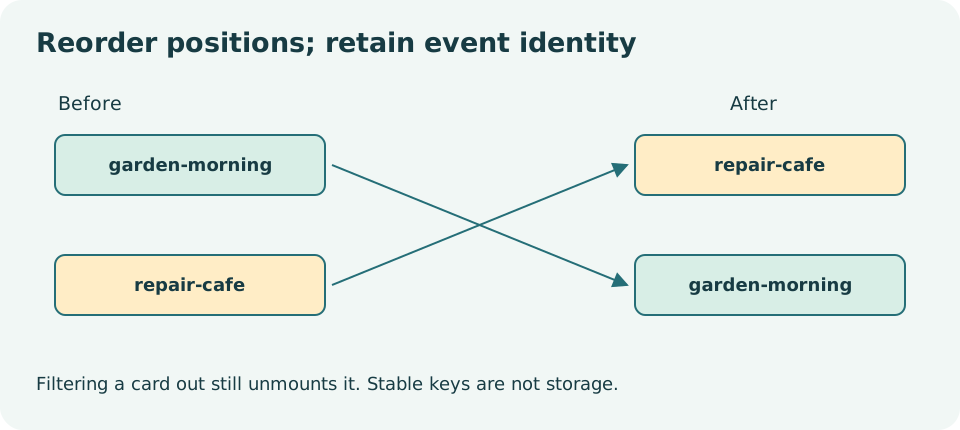
Read the diagram explanation
Before ordering has Garden then Repair. After ordering has Repair then Garden. Crossing arrows connect matching IDs, showing that identity follows records.
Save references rather than copies
The saved list is another identity problem. Store an array of event IDs instead of a second array of copied event objects. Then derive saved cards from the current event data. If an event's title changes in a future dataset, the saved list reads the new title instead of an old duplicated copy.
A toggle is a pure transformation:
function toggleId(ids: string[], id: string): string[] {
  return ids.includes(id)
    ? ids.filter((savedId) => savedId !== id)
    : [...ids, id];
}
In a component, call it through the functional state setter: setSavedIds((previous) => toggleId(previous, event.id)). The previous array is not mutated. Clicking twice returns to the original membership. The function can be tested without React because its rule is independent of the UI.
The saved button should expose its state with aria-pressed, and its accessible name should identify the event. A filled icon or color alone does not tell every user whether saving is active. Saving here means remembering an interest in this local demonstration; it must not imply that a place has been booked.
State belongs to a place in the tree
Stable keys preserve identity while an item remains in its list and moves relative to siblings. They do not preserve a component that is removed altogether. If filtering removes a card, React unmounts it; showing it again creates a new card instance with fresh local state. If a choice must survive that disappearance, lift it to a parent that remains mounted, keyed by event ID.
This distinction explains why saved IDs live above the visible list. A hidden event can remain saved. Its temporary expanded-card state, if any, can reasonably reset when the card disappears. Neither behavior is universally correct: state placement should match the promised user experience.
Changing a key intentionally creates a new identity. This can be useful when switching between two unrelated editors that must not share a draft. It can also destroy a user's unfinished input accidentally. Before adding a changing key to “fix” a stale display, ask what state you are discarding and whether you should instead correct the data flow.
Component definitions also affect identity
Defining a child component inside the parent's function produces a new function each time the parent renders. React can treat it as a different component type, causing state resets even with apparently sensible markup. Define components at module scope and pass required values as props. This makes the identity and the dependencies visible.
Do not use direct DOM mutations to rescue a state bug. If React owns a subtree, changing it behind React's back can leave the DOM and the next render out of agreement. Trace the component type, its position, its key and its state owner first.
Run a revealing experiment
Checkpoint 05 adds saved IDs to the filterable explorer. Save Garden morning, filter until it is hidden, then clear the filter. It should still be marked saved. Reorder the visible records in a copied experiment. The saved status should follow IDs rather than positions. A saved-only filter should derive its results from the same current records and saved IDs.
Now discuss an event that was saved but no longer appears in a refreshed dataset. The application should not invent a card from an old copy. A production product might show “no longer available” records or prune old preferences; this local course documents its simpler policy. Never silently turn a stale ID into a real booking.
Complete the exercises and the first assessment. Explain at least one state-lifetime decision in words before checking the worked solutions. You should be able to distinguish reordering, rerendering and unmounting; they are different events with different consequences.
Primary reading: rendering lists, preserving and resetting state, state structure, component definitions.
Read the separate answers and explanations
Reading progress
10 lessons remain open to guests. Marking a lesson read records reading only; it does not award assessment credit or a certificate.
Device reading marks require browser storage. Reading is always available.
Sign in or create an account to save separate account progress. Your current page is kept.
Your earlier place on this device suggests these lessons. No new lesson is marked read.