
React/TypeScript · Module 9
Give screens meaningful URLs
When a local boolean is no longer enough
A local showDetails boolean can reveal more text, but it cannot give someone a meaningful event address to bookmark. A separate event screen should work with Back and Forward, direct navigation and an unknown ID. Routing connects URL state to the UI.
Checkpoint 09 introduces React Router's declarative mode. The application remains a client-only teaching demo. We are not introducing a server framework, server rendering or backend loaders just to show two screens. The library is justified by actual navigation requirements rather than added because every project must contain it.
Choose a URL strategy deliberately
This package uses a hash router. A detail address ends with a fragment such as #/events/garden-morning. The part after # is interpreted by the client and is not sent to the server as a separate request path. This keeps the small multipage teaching package portable across simple static servers.
A browser-history router can produce cleaner paths such as /events/garden-morning, but the host must serve the app's HTML for valid client routes on a direct request. Otherwise a refresh can produce a server 404 even though clicking inside the app worked. Neither choice removes the need to test direct navigation and deployment base paths. A hash router is a scoped teaching choice, not a claim that all production apps should use fragments.
Map paths to screens
The basic relationship is explicit:
<HashRouter>
  <Routes>
    <Route path="/" element={<Explorer />} />
    <Route path="/events/:eventId" element={<EventDetail />} />
    <Route path="*" element={<NotFound />} />
  </Routes>
</HashRouter>
This excerpt assumes the components and router imports exist. The colon names a dynamic segment. EventDetail can read eventId with useParams and look for a matching record. That parameter is still uncertain input: it might be absent in a different route context or refer to no known record. Never assert that finding an event must succeed and then read properties from undefined.
There are two missing cases. An unmatched route such as /unknown shows the catch-all page. A matched /events/:eventId route with an unknown ID shows an event-not-found message. Both need a useful way back. If data are still loading, show loading before deciding that an event is missing; lack of loaded data is not evidence that the ID does not exist.
Use navigation controls as navigation controls
Use Link for an internal route so normal link semantics and client navigation agree. Its visible text should identify the event or destination. Do not attach a click handler to a card-shaped div and expect it to act like a link for keyboards, screen readers, context menus and opening a new tab.
A save button changes a preference and stays a button. It should not be nested inside a link. Give distinct actions their own controls. Avoid a large clickable card wrapper that makes text selection, nested buttons or focus order confusing.
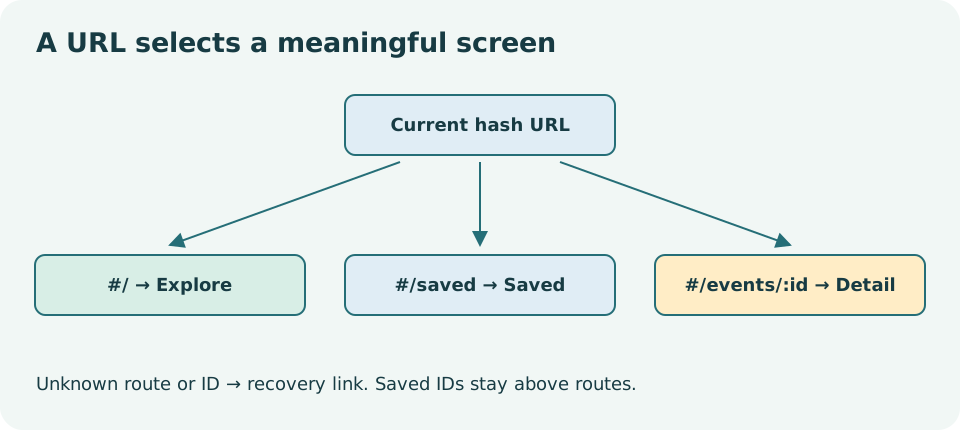
Read the diagram explanation
A central hash URL branches to Explore, Saved events and one event detail; unknown paths recover rather than crash.
Place state according to its intended lifetime
A component that unmounts loses its local state. If the explorer owns the query and disappears on detail navigation, the query may reset when you return. If the product promises to preserve it, keep that state in a common mounted parent or encode the relevant choice in the URL. Similarly, saved IDs should not be duplicated into independent explorer and detail states.
The reference makes its behavior explicit; inspect where the state owner sits relative to Routes. Decide whether a choice is transient UI state, shareable URL state, or a persistent browser preference. Do not place synthetic form fields in a URL. URLs are copied, logged and saved in history, so they are inappropriate for private form details.
This course keeps filter sharing simple rather than building a full query-parameter system. In a later extension, a query parameter could make a filtered view shareable, but it introduces parsing, defaults and history decisions. Add it only after you can explain the current routes reliably.
A new screen needs orientation
Client navigation changes content without a full document load. A sighted mouse user may notice the new heading while a keyboard or screen-reader user remains on a removed control. Handle focus and the document title as part of the navigation experience.
A ref can point to a page heading with tabIndex={-1}, allowing programmatic focus without adding a normal tab stop. After a route or loaded detail changes, focus that heading when the app's navigation policy calls for it. Updating document.title synchronizes React's selected screen with a browser system and is a legitimate effect. Do not steal focus on every keystroke or every unrelated state update.
A production navigation policy should also consider scroll position, loading announcements and Back/Forward behavior. The supplied manual checklist asks you to observe these rather than assume a routing library handles all accessibility automatically.
Exercise the URL, not just the click
Open a known event through its link. Copy the full local address, open it in another tab, and refresh. Use Back and Forward. Change the ID to an unknown value and try an unmatched route. Check the heading, title, focus and recovery link for each case. Saving on one screen should agree with the other screen according to the shared-state design.
Complete the exercises and record the direct URL used for each case. The solutions explain the state-lifetime tradeoff instead of treating every reset as a library bug.
Primary reading: declarative installation, routing, HashRouter, preserving state.
Read the separate answers and explanations
Reading progress
10 lessons remain open to guests. Marking a lesson read records reading only; it does not award assessment credit or a certificate.
Device reading marks require browser storage. Reading is always available.
Sign in or create an account to save separate account progress. Your current page is kept.
Your earlier place on this device suggests these lessons. No new lesson is marked read.