
HTML/CSS · Module 6
Arrange a flexible navigation row
Module 06 · 75–105 minutes, provisional
Before you begin: Module 05; normal flow, the box model, and responsive widths.
By the end: Use Flexbox for one-dimensional groups and predict wrapping, alignment, and spacing.
Choose layout from the relationship
Our site name and navigation belong on a shared header row when there is room, but they should wrap when the screen becomes narrow. This is a one-dimensional relationship: distribute a set of items along a main axis. Flexbox is a good fit. We will not use absolute coordinates to place the navigation, because its width changes when labels, fonts, or available space change.
Confirm that the wrapper containing the brand and nav has class="container header-row", as added in module 04. The container class is for page width; an element can have several classes separated by spaces. Setting display: flex on that wrapper makes its direct children flex items. It does not make every descendant a flex item. The nav’s list needs its own flex container if we want its li items in a row.
.header-row {
  display: flex;
  flex-wrap: wrap;
  justify-content: space-between;
  align-items: center;
  gap: 1rem;
}
.nav-list {
  display: flex;
  flex-wrap: wrap;
  gap: 0.5rem 1rem;
  list-style: none;
  padding: 0;
  margin: 0;
}
Read the axes before choosing an alignment property
The default flex-direction is row. In this English horizontal layout, that puts the main axis across the row and the cross axis vertically. justify-content handles distribution along the main axis; align-items aligns items on the cross axis. With a column direction, the axes switch. “justify is always horizontal” would therefore be a misleading shortcut.
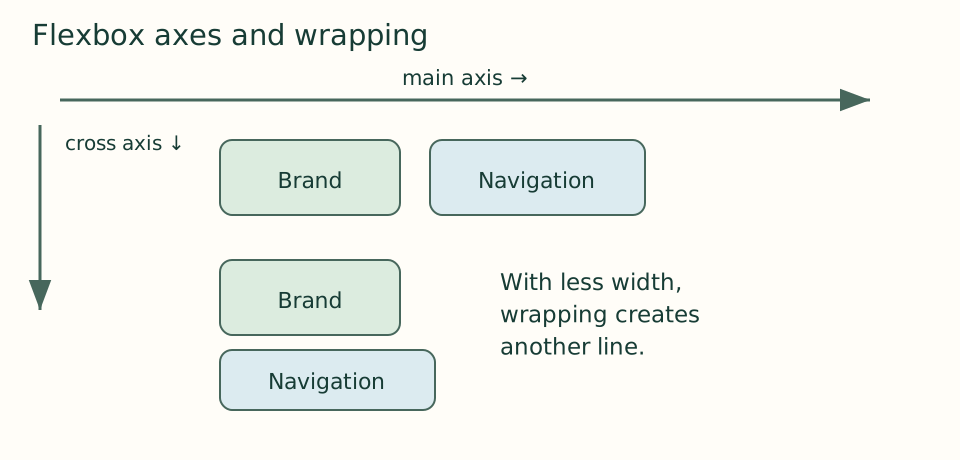 Open the diagram at full size
Read the diagram explanation
For row in horizontal English: main axis is horizontal, cross axis vertical. Wrapping moves items to another line.
space-between uses available free space between items, which places the brand and navigation toward opposite edges when both fit. gap provides a minimum gutter between them, including when they wrap. It does not create outside padding; the container still supplies page breathing room. align-items: center aligns the items across the row without relying on a magic top margin.
Wrapping is a design behavior, not a failure
Flexbox defaults to nowrap. With a long site name and several links, one line may not fit. flex-wrap: wrap permits items to move onto another line. A wrapped header is often clearer than making text tiny or hiding the navigation. We keep every destination visible; there is no hamburger menu that needs scripting to open. This supports the static-site boundary of our course.
Give each navigation link display: inline-block and comfortable padding. Its clickable area should include space around its words, rather than forcing a precise click on a letter. The li remains the flex item; the padded link is inside it. Removing list bullets changes appearance while the ul and li still provide list structure.
.nav-list a {
  display: inline-block;
  padding: 0.5rem 0.25rem;
}
Understand flexible sizing without memorizing a shorthand
Flex items can grow, shrink, or start from a basis. The shorthand flex: 1 1 12rem means a grow factor of 1, a shrink factor of 1, and a starting basis of 12rem. It does not promise a final width of 12rem, because the container distributes the available space. We do not need that shorthand for our header, but it explains why setting width on a flex item is not always the whole story.
Items also have an automatic minimum size that can resist shrinking below their contents. A long unbroken URL can therefore force overflow even when shrink is enabled. A targeted min-width: 0 and appropriate word wrapping may be needed. Do not respond by setting overflow: hidden on the whole page: that hides the evidence and can make content unreachable.
Keep the reading order honest
CSS order and reversed directions can rearrange appearance while source order stays the same. Keyboard focus and assistive-technology reading may then feel out of step with the visible layout. Put content in the intended source order first. Our brand precedes navigation, and Events precedes Plan your visit, both visually and in the HTML.
Try changing flex-direction to column temporarily. Predict where justify-content and align-items will act, then observe. Restore row by removing the temporary declaration. Next make the browser narrow enough that the navigation wraps. The correct question is not “Does it match a screenshot?” but “Are every label and focus indicator still visible, with sensible order and room to activate links?”
Checkpoint: compare with version 06 — download the course ZIP (Extract it and follow the included setup instructions for versions/06/index.html.). Only header/navigation layout changes. Event cards remain vertically stacked so that the next lesson can isolate the difference between Flexbox and Grid.
Open the checkpoint source
The runnable-version link shows the result. To inspect or copy its source, use your editor’s Open Folder or Open File command and choose versions/06/index.html inside the extracted course folder. From module 04 onward, also open that version’s styles.css. Keep your own harbor-work folder separate. Compare a small section, then type or transfer it into the corresponding place in your own files; opening a reference does not update your project automatically.
Your next step
Attempt the three practice tasks, then use the separate explained solutions to compare reasoning. Open this module’s runnable version — download the course ZIP (Extract it and follow the included setup instructions for versions/06/index.html.). Technical references are listed in the dated source register.
Read the separate answers and explanations
Reading progress
10 lessons remain open to guests. Marking a lesson read records reading only; it does not award assessment credit or a certificate.
Device reading marks require browser storage. Reading is always available.
Sign in or create an account to save separate account progress. Your current page is kept.
Your earlier place on this device suggests these lessons. No new lesson is marked read.